
When I model business processes, I also prepare for failure. Not every task works as planned. That is why I use an error event in BPMN. It helps me show where something can go wrong and how the process should react. In this article, I explain the main error event types and show how they create clear failure paths in a real-world BPMN example.
Let’s begin with the basics.
What is BPMN 2.0?
BPMN 2.0 stands for Business Process Model and Notation 2.0. It’s a widely used standard for modeling processes. I use it to describe tasks, decisions, and events using easy-to-understand symbols.
Because BPMN is visual, my team and I can collaborate better. Everyone sees the same structure. Furthermore, BPMN supports everything from simple workflows to complex, rule-based systems.
Learn more about Process Management with What is BPM and Bridging the Gap Between Process Management Disciplines (open in new tabs).
Events in BPMN 2.0
Events show that something has happened. They might trigger a process. They might interrupt it. Or they might mark its end. In BPMN, I use three main types of events:
Each event has a specific symbol. Moreover, BPMN includes several event types. These include message events, escalation events, timer events, and—most importantly for this article—error events.
Understanding the Error Event in BPMN
Now, let’s focus on the error event in BPMN. I use it when something serious goes wrong in the process. For example, if a system crashes or a user enters invalid data, this event comes into play.
BPMN offers two ways to represent an error:
- Boundary Error Event – attached to a task.
- Error End Event – thrown when a process path ends with failure.
Each one serves a different purpose. Let’s look at them in more detail.
The Boundary Error Event
This event attaches to the boundary of a task. When the task throws an error, the normal flow stops. Instead, the process switches to a separate path.
This type of error event always interrupts the task it’s attached to. That makes it very useful. I can clearly show what happens when something fails mid-process.
The Error End Event
I use this event to show that a process path ends with an error. It signals that the task failed and that the process didn’t complete as planned.
Why do I use it? Because the process that called this one might need to react. For instance, it could trigger an alert or start a new subprocess to fix the issue.
In both cases, the error event in BPMN helps me describe the failure and the response.
Example: Failed Refund Handling
Let’s say an online store handles customer refund requests. The normal process might look like this:
- Receive refund request
- Validate refund reason
- Process the refund
- Send confirmation
However, errors can occur. For example, the refund period might have expired. Or the payment method might be invalid. To model these cases, I use error events.
Let’s explore this scenario in four steps.
Step 1: Start the Process
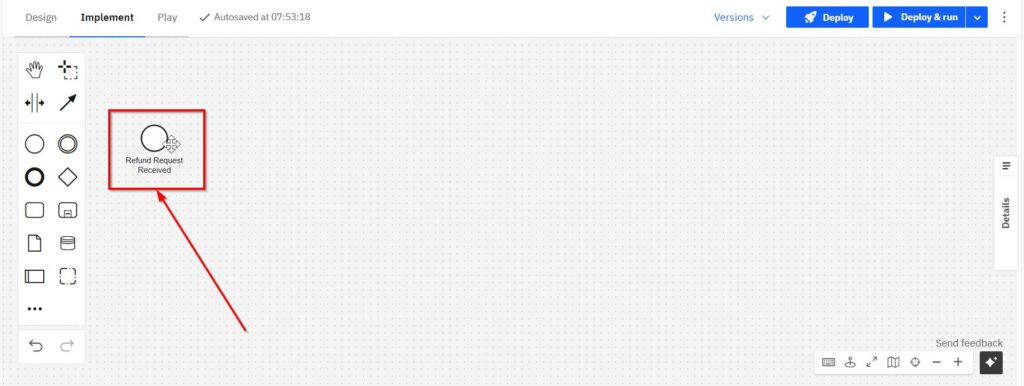
The process begins with a Start Event labeled “Refund Request Received.”
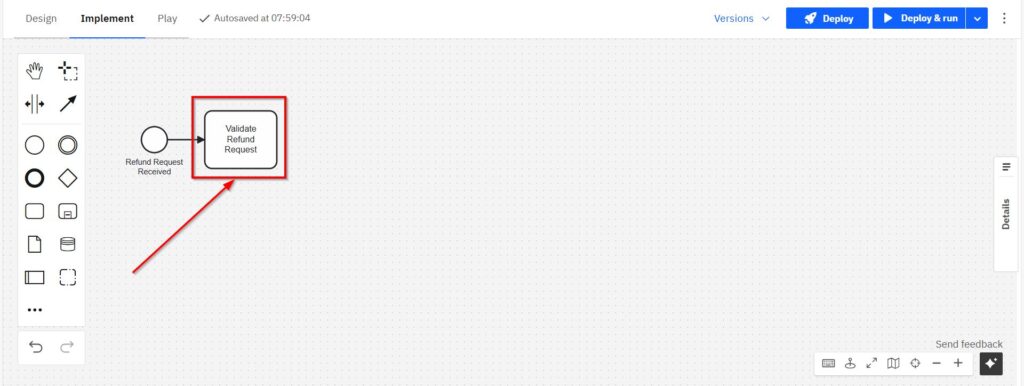
Next, I place a User Task labeled “Validate Refund Request.”
Step 2: Add a Boundary Error Event
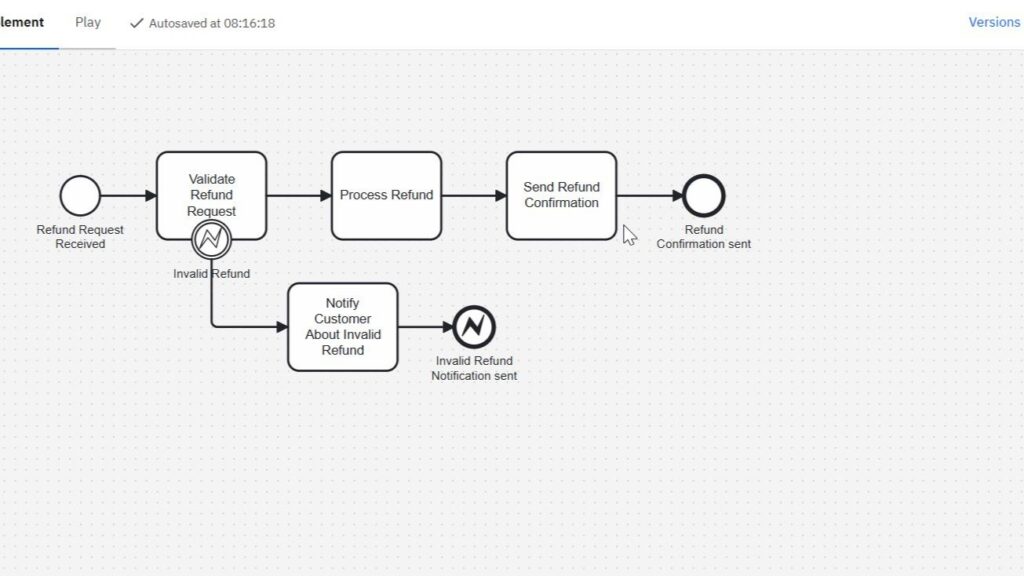
I attach a Boundary Error Event to “Validate Refund Request.” I name it “Invalid Refund.”
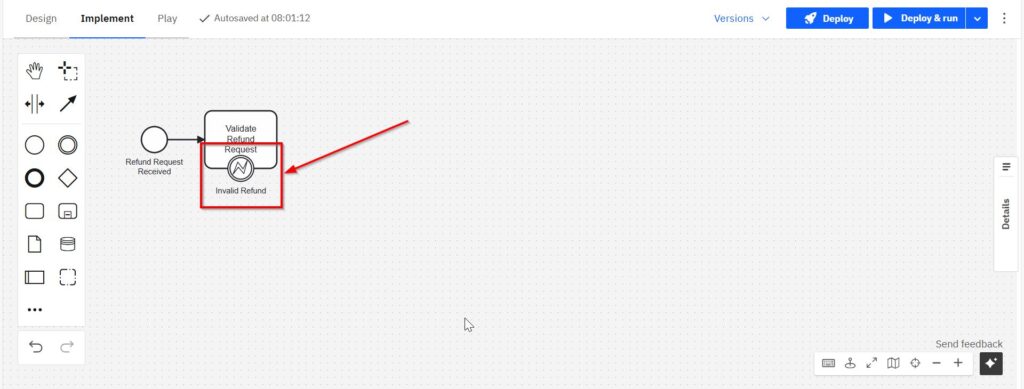
This represents a failed validation.
From this event, I connect a User Task called “Notify Customer About Invalid Refund.”
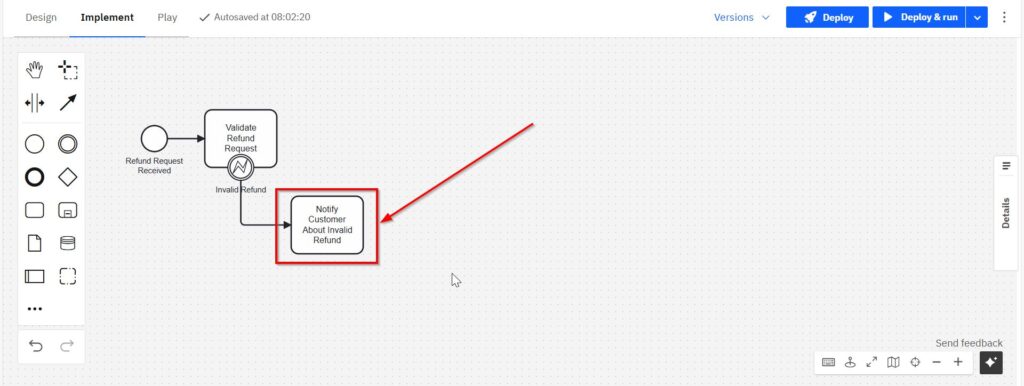
This shows what happens if the refund reason doesn’t meet the criteria.
Step 3: Model the Success Path
After validation, I continue with a Service Task called “Process Refund.” Then I add a User Task labeled “Send Refund Confirmation.”
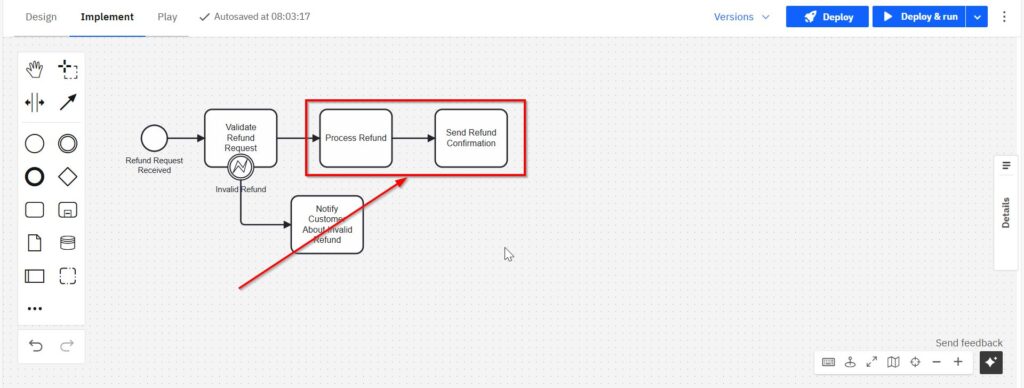
After that, I end the flow with a normal End Event called “Refund Confirmation Sent.”
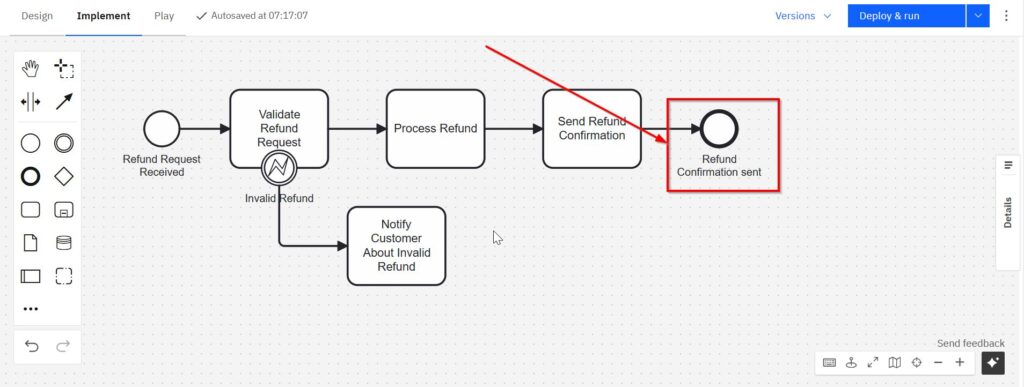
Step 4: Handle the Error
After the “Notify Customer” task, I end this path using an Error End Event labeled “Invalid Refund Notification Sent.”
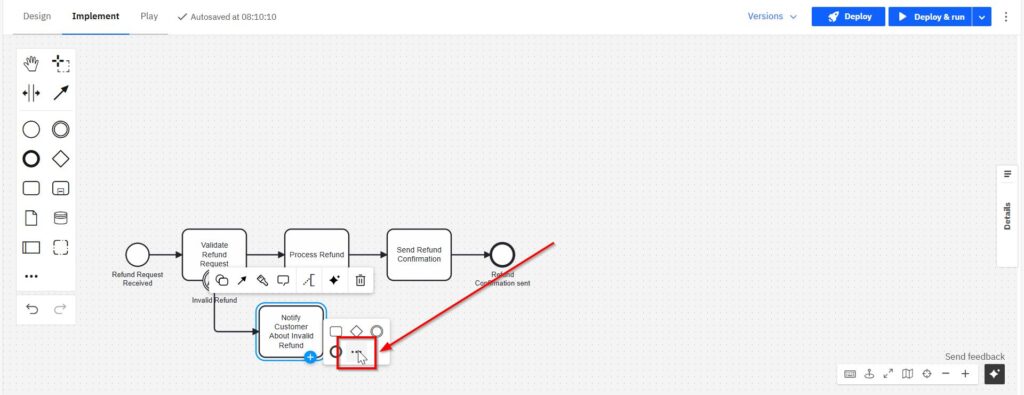

This structure makes the process logic easy to follow. When something goes wrong, the diagram shows a clear and separate error path.
Why Error Events Matter
Errors are part of reality. I’ve never seen a process that runs perfectly all the time. That’s why I always include error events in my BPMN diagrams.
They help me show what could fail. Even better, they let me explain how the process responds to those failures. I believe this improves the quality of my models. It also makes the process easier to understand.
Moreover, when a process includes an error end event, the higher-level process can catch it. That opens the door to escalation handling or compensation tasks.
Final Thoughts
To sum it up: the error event in BPMN is a must-have for professional process modeling. I use it whenever something can go wrong—because something always does.
Boundary error events help me model how to switch paths when a task fails. Error end events help me report problems back to the parent process. Together, they make my diagrams complete, realistic, and reliable.
When I model processes, I don’t just show what should happen. I also show what might happen—and how we handle it. That’s why I trust the error event in BPMN every time I model for failure.
Explore Processes and Requirements Modeling
Discover how effective process management and requirements modeling help organizations understand, improve, and automate business operations. Explore Processes to learn about process management, BPMN, and workflow automation with Camunda. Dive into Requirements Modeling to understand fundamental modeling concepts, process modeling with BPMN, and UML. Both topics provide practical knowledge, methods, and tools for business analysis, requirements engineering, and process improvement.
Credits: The diagrams were created with Camunda.
| Read more about Business Process Modeling and Notation (BPMN) |
|---|
| Exclusive Gateways in BPMN 2.0: Clear and Simple Parallel Gateways in BPMN 2.0: Understanding and Using Them Effectively Event-Based Gateways in BPMN 2.0: A Practical Guide Complex Gateways in BPMN 2.0: A Simple Guide |