
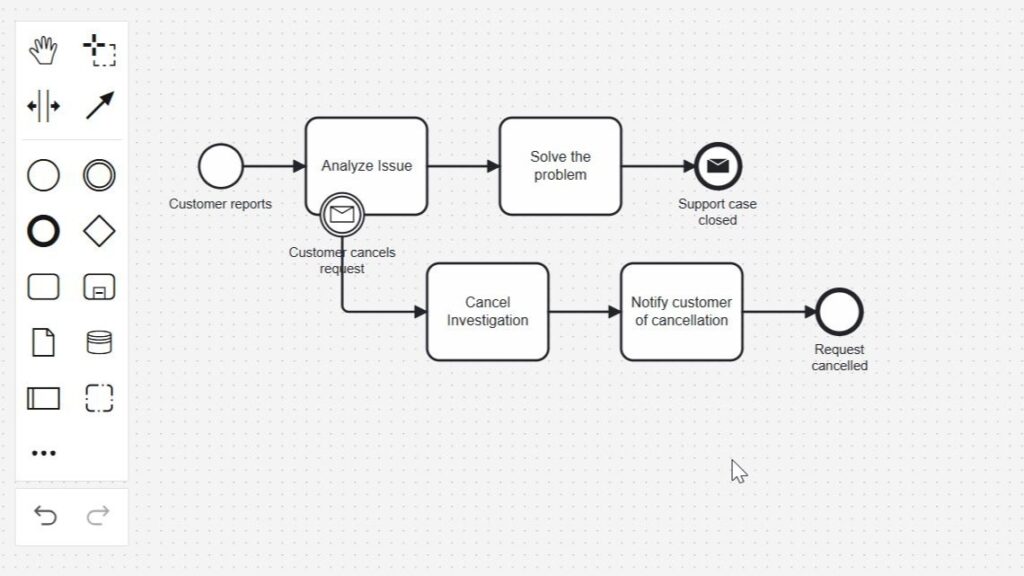
When a customer message changes a process, I need a clear BPMN response. That is when I use an attached message event in BPMN. It can interrupt a task or react without stopping the current work. This helps me model feedback, urgent updates, and alternative paths in a clean way. In this article, I explain the concept with a simple BPMN 2.0 example step by step.
What Is a BPMN Message Boundary Event?
I use a BPMN message boundary event when a running activity must react to an incoming message.
I place the event directly on the boundary of the activity. Therefore, the relationship between the message and the affected activity remains visible in the process model. The event waits while the activity runs. If the expected message arrives, the event triggers its defined sequence flow.
For example, I may model a support agent who analyzes a customer issue. While the agent works, the customer may send another message and cancel the request. In that case, I do not want the investigation to continue unnecessarily.
A message boundary event lets me model this reaction exactly where the message affects the process.
This behavior differs from a message event that appears independently in the normal process flow. The boundary event belongs to the activity to which I attach it.
Interrupting and Non-Interrupting Message Boundary Events
A message boundary event can affect the attached activity in different ways.
I use an interrupting message boundary event when the incoming message makes the current activity unnecessary. Once the message arrives, I stop the activity and continue along the sequence flow that starts at the boundary event.
By contrast, I can use a non-interrupting reaction when the current activity should continue. The process can then react to the message without ending the work already in progress.
The key modeling question is whether the incoming message should stop the current activity or merely trigger additional process behavior.
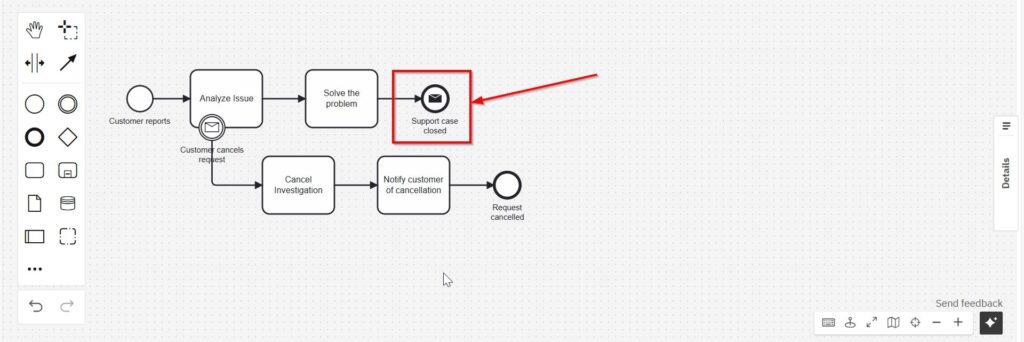
In the following example, I use the interrupting variant. A customer cancellation makes the ongoing investigation unnecessary. Therefore, the process leaves the normal path and follows a cancellation path instead.
Example: A Customer Cancels a Support Request
I use a simple customer-support process to show the behavior.
First, a customer reports that software has crashed. The support process starts, and an agent begins to analyze the issue.
However, the customer may send another message while the analysis is still running. For example, the customer may discover that the problem resulted from a mistake and cancel the original request.
At that point, I no longer need the investigation.
Therefore, I attach an interrupting message boundary event to the analysis task. If the cancellation message arrives, the event interrupts the task and redirects the process.
This example shows why the timing of the message matters: the process must remain ready to react while the affected activity is still active.
Step 1: Start the Support Process
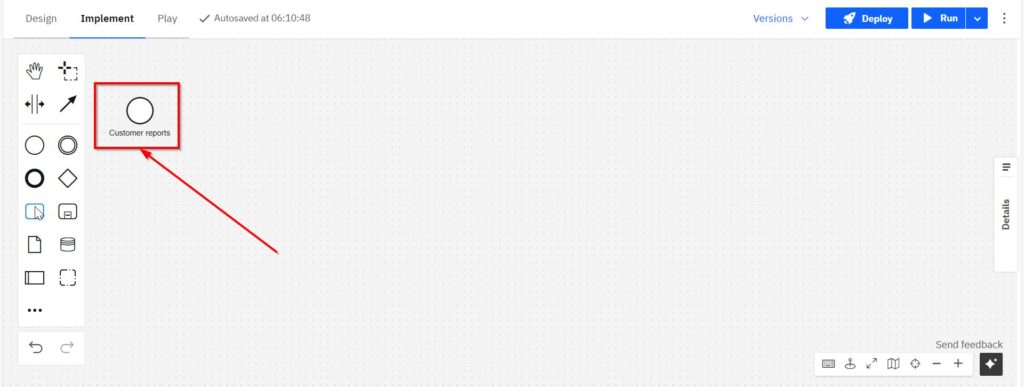
I begin with a message start event. I label it “Customer reports.”
The event represents the incoming customer report that starts the support workflow. From there, I connect the event to the activity that handles the request.
Step 2: Add the Main Task
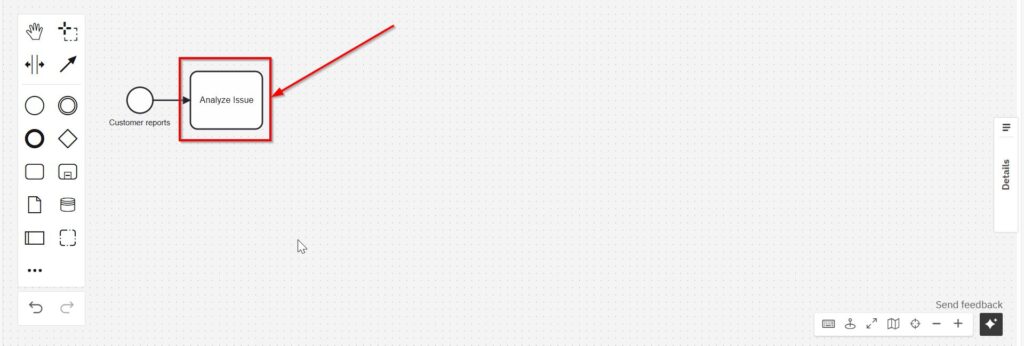
Next, I add the user task “Analyze issue.”
This task represents the work that the support agent performs after receiving the report. At this stage, the process follows a simple sequence: the customer reports the problem, and the agent starts the analysis.
However, the analysis may take time. Therefore, something can happen before the task finishes.
That situation creates the need for the boundary event.
Step 3: Attach the Message Boundary Event
Now I attach a message boundary event to the “Analyze issue” task.
I label the event “Customer cancels request.”
Because I use the interrupting variant, the event waits for the cancellation message only while the analysis task remains active. If the customer sends that message, the event triggers and interrupts the analysis.
I attach the event to the task because the customer message directly changes whether that task should continue.
This placement also makes the process logic easy to read. I do not need a separate decision after the analysis task. Instead, the model shows that the cancellation can occur during the analysis itself.
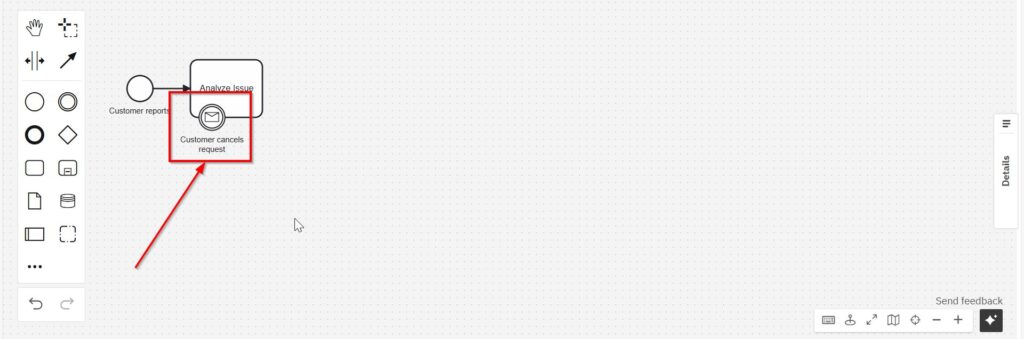
This is the attached message event in BPMN. It listens for follow-up feedback while the task runs.
4. Define the Cancellation Path
If the message arrives, the process takes a different path. First comes a service task: “Cancel investigation”.
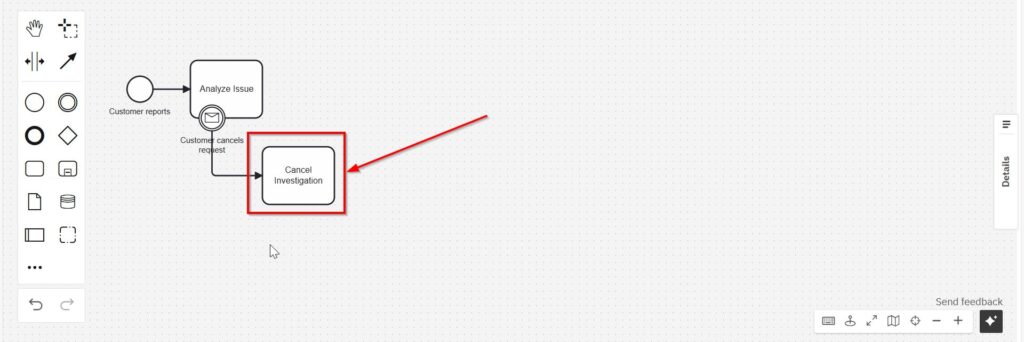
After I cancel the investigation, I notify the customer. Therefore, I add the send task “Notify customer of cancellation.”
This step makes the response explicit in the model. The process does not only stop the internal work. It also communicates the outcome to the customer.
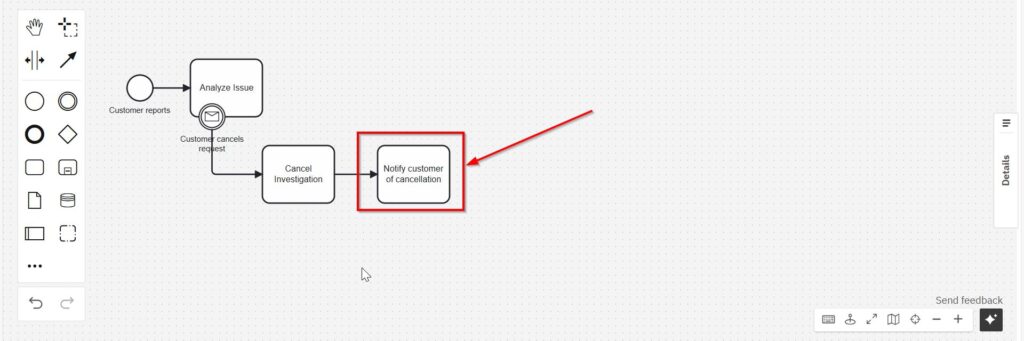
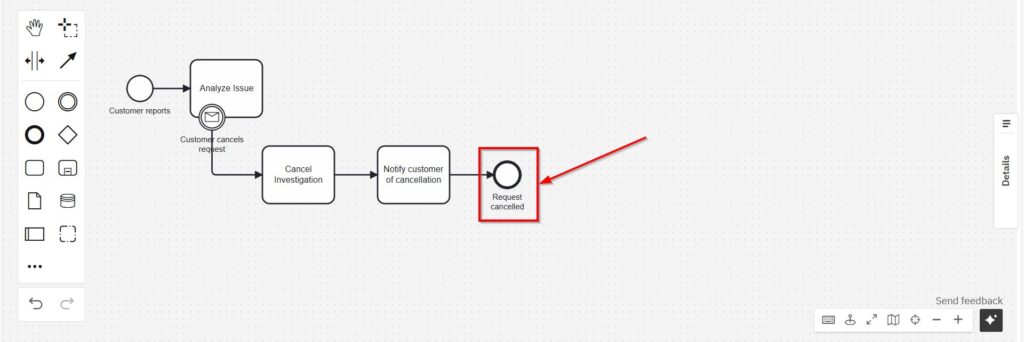
Finally, I end this branch with the end event “Request cancelled.”
As a result, the cancellation path has a clear beginning and a clear outcome. The incoming message interrupts the analysis, the process cancels the investigation, the customer receives a notification, and the request ends as cancelled.
The cancellation path represents a complete process outcome rather than an isolated exception.
Step 5: Complete the Standard Path
I also need to model what happens when the customer does not cancel the request.
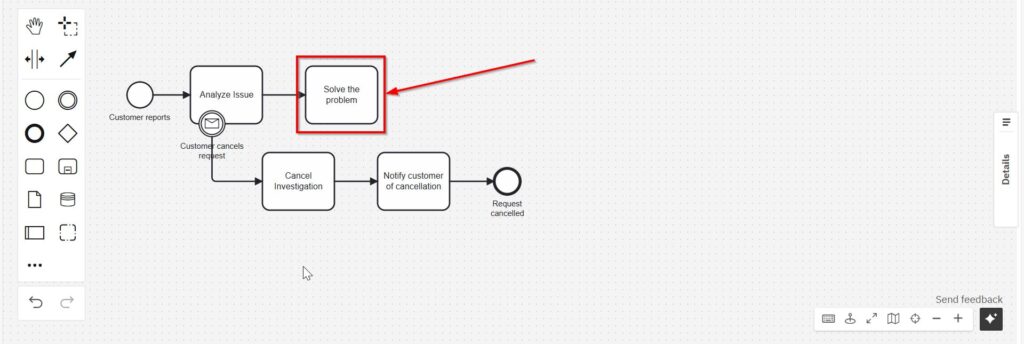
In that case, the message boundary event does not trigger. Instead, the “Analyze issue” task finishes normally.
Next, the process continues to “Solve the problem.”
Therefore, the standard path remains independent from the cancellation path. The process follows it only when the analysis continues to completion.
Finally, I close the successful support path with the message end event “Support case closed.”
The complete model now describes two possible outcomes. Either the support team completes the work, or a customer cancellation interrupts the investigation and ends the request through the alternative path.
What Happens When the Message Arrives?
The timing becomes especially important with a boundary event.
While “Analyze issue” remains active, the attached message boundary event can react to the expected cancellation message.
If that message arrives, the interrupting event triggers. Therefore, the analysis stops, and the process continues with “Cancel investigation.”
However, if no cancellation message arrives, nothing happens on that branch. The agent completes the analysis, and the process continues along the standard path.
The message boundary event does not replace the normal sequence flow. Instead, it creates an alternative reaction while the attached activity runs.
This behavior allows me to represent situations in which new information changes work that has already started.
Why I Use Message Boundary Events
I use message boundary events when a process must remain responsive to communication during an activity.
For example, they fit customer-support processes because customers can update or cancel requests while employees work on them. They can also support approval workflows when new information changes an ongoing review. Likewise, they can help me model incident-handling processes in which an incoming message changes the required response.
The main advantage is clarity. I can see which activity waits for the message and what the process does when that message arrives.
Moreover, I avoid unnecessary work. In the example, the support agent does not continue investigating a request that the customer has already cancelled.
A well-placed message boundary event connects an incoming message directly to the activity that the message can change.
When I Choose an Interrupting Message Boundary Event
I use the interrupting variant when the incoming message makes the current activity obsolete.
The customer cancellation in this example meets that condition. Once the customer cancels the request, continuing the investigation would no longer make sense. Therefore, I stop the task and redirect the process immediately.
However, not every message requires an interruption. If the message only provides additional information and the current activity should continue, I need different behavior.
Therefore, I first ask what the message means for the running work. Then I decide how the process should react.
I use an interrupting message boundary event only when the incoming message should end the activity to which I attach it.
Keep the Message and the Reaction Specific
I give the event a name that describes the actual message or business event. In this example, “Customer cancels request” clearly states what happened.
I also keep the following path specific. The process does not continue to a vague task such as “Handle cancellation.” Instead, I show the concrete consequences: cancel the investigation, notify the customer, and end the request.
As a result, another reader can understand the process without guessing what the exception means.
Clear names also help me distinguish the trigger from the reaction. The customer cancellation triggers the event. The process then performs the cancellation activities.
Conclusion
A BPMN message boundary event helps me model a message that can affect work while that work is still running. I attach the event directly to the relevant activity. Therefore, the model clearly shows where the process listens for the message and what happens when the message arrives.
In the customer-support example, the customer can cancel a request during the analysis. The interrupting boundary event then stops the analysis and starts the cancellation path. If no cancellation message arrives, the process completes the normal support path instead.
I use a BPMN message boundary event when an incoming message can change the course of an active process at a clearly defined point.
This keeps the process responsive while preserving a clear distinction between the normal flow and the message-driven alternative.
What BPMN 2.0 Really Does
Business Process Model and Notation 2.0, or BPMN 2.0, is a standard I use to visualize business processes. It helps me show tasks, events, and flows using clear symbols. Because the notation is standardized, everyone understands the diagram—even across departments.
Moreover, BPMN helps me identify exceptions early. I can also prepare reactions to unexpected changes. Read more about Process Management in Bridging the Gap Between Process Management Disciplines and Unclear Responsibilities in Process Analysis.
Processes and Requirements Modeling
Understanding business processes and modeling requirements are essential skills in business analysis and systems development. Explore Processes to learn about Process Management, BPMN, and Camunda, and discover how to analyze, optimize, and automate business workflows. Dive into Requirements Modeling to understand fundamental Modeling Concepts, Process Modeling with BPMN, and UML, and learn how to represent complex requirements clearly and systematically. Both topics provide practical methods, tools, and techniques to improve business processes and develop effective solutions.
Credits: The diagrams were created with Camunda.
| Read more on Business Process Modeling and Notation (BPMN) |
|---|
| Syntax and Semantics of BPMN BPMN Project Roles for Effective BPM The Participant Perspective in BPMN BPMN Core Elements |