
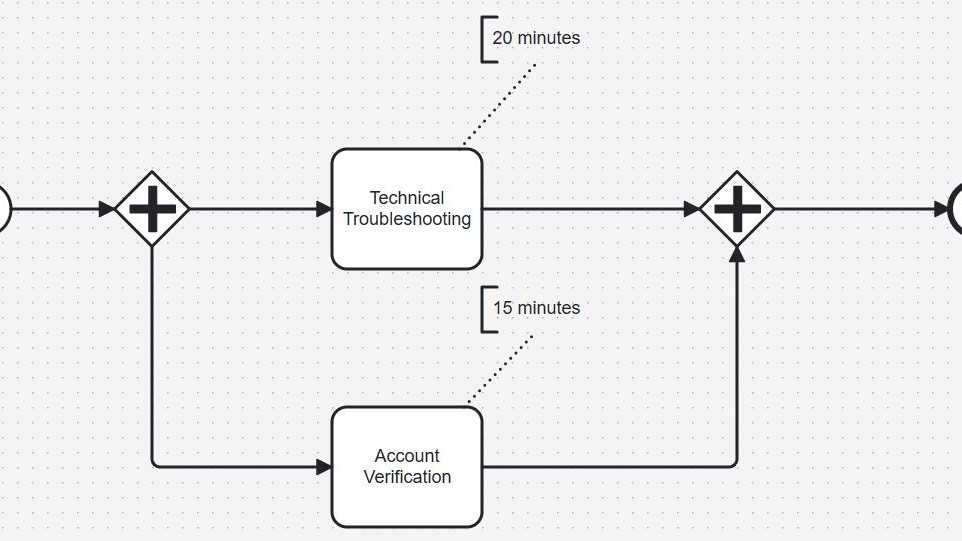
Parallel gateways in BPMN 2.0 help me model tasks that should run at the same time instead of one after another. This makes processes faster and often easier to understand. In this article, I explain parallel gateways in BPMN 2.0 in a clear and simple way. As a result, I can show how parallel flows work and when this gateway improves process efficiency.
What Is a Parallel Gateway in BPMN?
I use a parallel gateway when a process needs to activate several paths instead of choosing one path.
BPMN represents the gateway as a diamond with a plus sign inside. For this reason, I can distinguish it easily from exclusive and inclusive gateways.
A parallel gateway can perform two important functions:
- A parallel split activates every outgoing sequence flow.
- A parallel join synchronizes several incoming sequence flows.
A parallel gateway does not make a decision. It activates all outgoing paths.
Therefore, I do not attach business conditions such as “customer approved” or “amount above €1,000” to a parallel split. If the process needs to evaluate conditions, I use another gateway type.
How a Parallel Split Works
Suppose I receive a customer request. Before I can respond, I need to complete two independent activities:
- Technical troubleshooting
- Account verification
I do not need to finish technical troubleshooting before I start account verification. Therefore, I can place a parallel gateway before these tasks.
When the process reaches the gateway, it activates both outgoing sequence flows.
Conceptually, BPMN describes this behavior with tokens. One token reaches the gateway. The gateway then creates one token for each outgoing sequence flow.
As a result, both process branches can continue independently.
The parallel split creates parallel process paths without evaluating conditions or selecting between them.
However, “parallel” does not necessarily mean that two people or computer systems perform the work at exactly the same physical moment. BPMN describes the process logic. The actual execution depends on available employees, systems, resources, and the process engine.
This distinction matters. I use the gateway to express that one branch does not need to wait for the other before it can start.
Example: Handling a Customer Request
The customer support example shows this logic clearly.
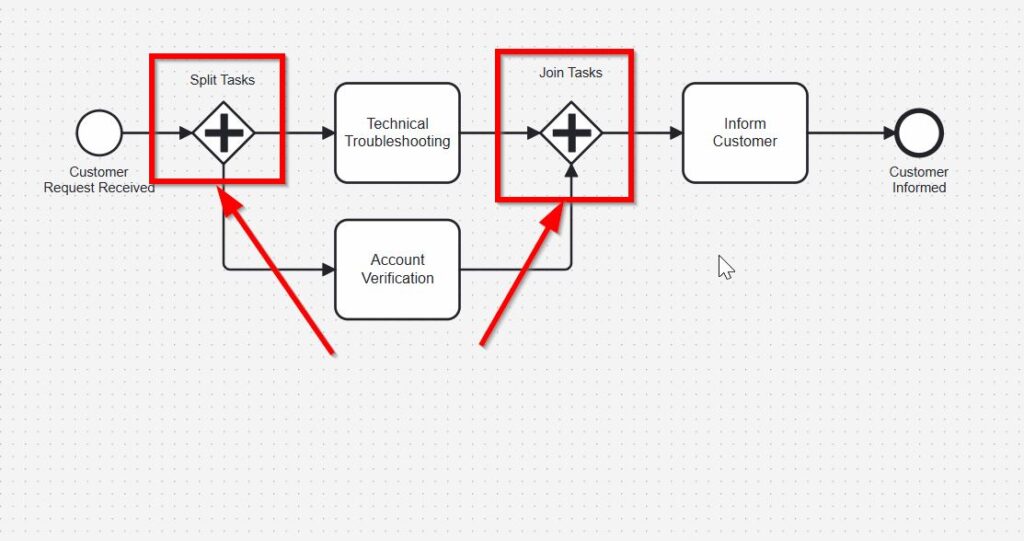
After the process receives a customer request, the first parallel gateway starts two branches. One branch leads to technical troubleshooting. The other leads to account verification.
Neither task depends on the completion of the other. Therefore, both branches can progress separately.
Once both activities finish, the process needs to inform the customer. At this point, I need synchronization. Consequently, I use a second parallel gateway as a join.
How a Parallel Join Works
The second gateway performs a different function.
Instead of creating several paths, it brings them together.
In my example, account verification might finish before technical troubleshooting. However, the process must not continue to “Inform Customer” yet. The join still expects the other branch.
Once technical troubleshooting also finishes, both incoming paths have reached the gateway. The gateway can then continue with the next sequence flow.
A parallel join waits for all required incoming paths before it lets the process continue.
This behavior makes the gateway useful whenever several activities can start independently but a later activity depends on all of them.
For example, I might use the same pattern when:
- several departments prepare parts of a report;
- separate systems perform independent checks;
- different teams prepare components for a release;
- several documents require processing before approval can continue.
In each case, the split expresses concurrency. The join expresses synchronization.
Split and Join Are Different Responsibilities
Although BPMN uses the same symbol for both functions, I distinguish them by their sequence flows.
A gateway with one incoming flow and several outgoing flows acts as a split.
A gateway with several incoming flows and one outgoing flow acts as a join.
A gateway can also combine both behaviors. For example, it can synchronize several incoming paths and then create several new outgoing paths. However, I normally avoid such compact models when separating the two functions makes the process easier to understand.
I prefer explicit process logic over saving one gateway symbol.
Clear models usually matter more than small models.
Parallel Gateways Do Not Evaluate Conditions
This rule separates parallel gateways from decision gateways.
Suppose I have three outgoing paths:
- perform technical troubleshooting;
- verify the account;
- check previous support cases.
If I use a parallel gateway, I mean that the process activates all three paths.
I do not mean “activate the paths whose conditions happen to be true.”
Therefore, if I need one path from several alternatives, I use an exclusive gateway. If I need one or more paths depending on conditions, I use an inclusive gateway.
A simple distinction helps me choose:
| Requirement | Gateway |
|---|---|
| Exactly one alternative should continue | Exclusive gateway |
| One or more alternatives may continue | Inclusive gateway |
| Every path should continue | Parallel gateway |
When every outgoing branch must run, I use a parallel gateway.
Why Synchronization Matters
A parallel split does not automatically require a parallel join.
Sometimes the branches can continue independently until they end. In that case, I may not need to synchronize them.
However, I need a join when a later activity depends on the completion of every branch.
Consider the customer support example again. I should not inform the customer that processing has finished while account verification still runs. Therefore, the join represents an important business rule: both activities must finish first.
This is more than a visual convention. The gateway defines the execution logic of the process.
A Common Modeling Error: Creating a Deadlock
Parallel joins require careful modeling.
Suppose I create two incoming paths to a parallel join, but an earlier decision means that only one of those paths can ever run. The join will still wait for the second path.
However, that token will never arrive.
The process can therefore stop at the gateway.
I only use a parallel join when the process can actually produce a token on every incoming path that the join expects.
This rule becomes especially important when I combine parallel, exclusive, and inclusive gateways in larger models.
For example, I should not usually merge two mutually exclusive alternatives with a parallel gateway. If only one alternative can run, the parallel join expects something the process cannot provide.
Do I Always Need a Gateway to Merge Parallel Paths?
Not every convergence requires synchronization.
If two sequence flows simply lead into the same activity, I need to understand what that means before removing the gateway. Multiple incoming sequence flows on an activity do not automatically create the same synchronization behavior as a parallel join.
Therefore, when the process must explicitly wait for several parallel branches, I model that requirement with a parallel gateway.
This also makes my intention visible to readers.
I use the join when “all branches must finish” forms part of the business logic.
When I Use Parallel Gateways
I use parallel gateways when three conditions apply.
First, more than one process path should become active.
Second, the process does not need to choose between those paths.
Third, the activities can progress independently, at least until a later synchronization point.
Typical examples include independent validations, parallel preparations, simultaneous notifications, separate technical checks, or work performed by different organizational units.
However, I do not introduce parallelism only to make a diagram look faster. I first check whether the activities really have no dependency.
If task B requires information from task A, I model them sequentially instead.
Parallel Gateways and Process Duration
Parallel execution can reduce overall process duration, but I treat this as a possible consequence rather than a property of the gateway itself.
For example, imagine that one task takes 20 minutes and another takes 15 minutes. Sequential execution requires 35 minutes before both tasks finish. If resources allow both tasks to run concurrently, they could finish after approximately 20 minutes.
However, BPMN itself does not guarantee this improvement.
Employees may not be available. Systems may queue jobs. One branch may wait for external information.
Therefore, I use BPMN to model dependencies first. I analyze performance separately.
The parallel gateway defines which activities may proceed independently; it does not guarantee that the organization executes them simultaneously.
Rules I Keep in Mind
When I model parallel gateways in BPMN 2.0, I follow a few simple rules:
- I use a parallel split when every outgoing path must become active.
- I do not use it to model business decisions.
- I use a parallel join when the process must wait for every incoming branch.
- I check whether every expected incoming token can actually reach the join.
- I keep dependent activities sequential.
- I separate split and join gateways when this improves readability.
These rules keep the model both understandable and technically correct.
Final Thoughts
Parallel gateways provide a precise way to model concurrency and synchronization in BPMN.
I use the split when several process paths should continue without choosing between them. Furthermore, I use the join when those paths must come together before the process can proceed.
The most important distinction is simple.
A parallel split means “do all of these,” while a parallel join means “wait until all of these are complete.”
Once I keep that rule in mind, I can use parallel gateways to express complex process behavior with very little notation.
What’s Next?
If I want to understand BPMN more clearly, the next step is to look at processes from the right point of view. That is why I continue with The Participant Perspective in BPMN. In that article, I explain how participants shape process understanding and why perspective matters so much in BPMN models. As a result, I can describe responsibilities, interactions, and process boundaries more clearly and create diagrams that communicate much better.
Explore the Full Picture with Requirements Modeling
If I want to understand requirements in a clearer and more practical way, I need more than text alone. I need models that show how concepts, processes, and system structures connect. In the main article on Requirements Modeling, I explore essential Modeling Concepts, Process Modeling with BPMN, and the structural perspective of UML. Together, these topics help me analyze requirements more clearly, communicate them more effectively, and build a stronger foundation for successful system design.
With these insights, I can also take the next step into the main article on Processes. There, I explore Process Management, BPMN, and Camunda as a practical tool for BPMN modeling. Therefore, I can connect requirements with real workflows, process structures, and improvement opportunities. Click through to learn how Processes help me structure work, improve collaboration, and turn process knowledge into practical business value.
Credits: The diagrams were created with Camunda.
| Read more on Business Process Modeling and Notation (BPMN) |
|---|
| Syntax and Semantics of BPMN BPMN Project Roles for Effective BPM The Participant Perspective in BPMN BPMN Core Elements |