

A signal event in bpmn helps me model communication without one fixed receiver. I use it when a process must announce something broadly and any listening process may react. In this article, I explain all BPMN 2.0 signal events with simple examples, clear use cases, and practical modeling tips. Let’s dive in.
What is BPMN 2.0?
BPMN 2.0 stands for Business Process Model and Notation. It gives me a visual way to describe how a process works. Everyone — developers, analysts, or business stakeholders — can understand it. That’s why I rely on it when I want clarity and structure. ChatGPT said:
To deepen your understanding, you can also explore “BPMN Core Elements with Camunda: My Hands-On Guide” and “Getting Started with Camunda Home User Interface: Your Guide to the Basics”.
What Are Events in BPMN?
Events show when something happens in a process. They help me:
- Start a process,
- Pause in the middle,
- Or finish it.
Some events send something — like a message or a signal. Others wait for something. The signal event is unique. It works like a radio broadcast. Anyone listening can respond.
Unlike messages, signal events don’t have a set recipient. They go out into the system. Whoever is tuned in — can act.
All Signal Events in BPMN Explained
I can use six types of signal events. Each one has a specific purpose. Let’s walk through them — one by one.
Signal Start Event
This event begins a process when a signal is received. I use it when the process shouldn’t start manually or with a message. Instead, it listens passively.
Example: When a company launches a new product, a signal is broadcast. The process “Start Product Campaign” begins as soon as this signal arrives.

Signal Intermediate Catch Event
This one pauses a process in the middle. It waits for a signal. Once it receives it, the process continues.
Example: I want to send a newsletter — but only after I get approval. I insert a signal catch event named “SendNewsletterSignal.” The process halts there. Once I get the go-ahead, it moves forward.

Signal Intermediate Throw Event
I use this to send a signal in the middle of a process. The process doesn’t stop. It just broadcasts something and continues.
Example: I onboard a new team member. After saving their data, I send a signal “EmployeeDataReady.” Other departments like HR or IT can pick it up and start their tasks.

Signal End Event
This signal fires when the process ends. It not only closes the flow but also sends a broadcast.
Example: After handling customer feedback, I throw a signal “FeedbackProcessed.” Other processes — like analytics — can start next.

Signal Boundary Event
This type is attached to a task. When it catches a signal, it interrupts the task and takes a different route.
Example: I’m filling out a long form. Suddenly, I receive a signal “CancelApplication.” The current task ends, and a new flow takes over.

Signal Boundary Event (Non-Interrupting)
Sometimes, I want to respond to a signal — but not stop the task. This event lets both flows run in parallel.
Example: While I’m reviewing a document, someone asks for help. I receive a “HelpRequested” signal. I handle it, but I keep reviewing the document too.

A Webinar Example Using Signal Events
Understanding BPMN 2.0 Signal Events
Signal events in BPMN 2.0 represent a way to broadcast or receive information across different parts of a process—or even across different processes. Unlike message events, which target a specific receiver, a signal is like a broadcast radio transmission. Everyone who is listening for it will react when the signal is sent.
To make this clearer, let’s walk through a simple example. Imagine we are modeling the preparation and execution of a webinar.
Example: Webinar Process with Signal Events
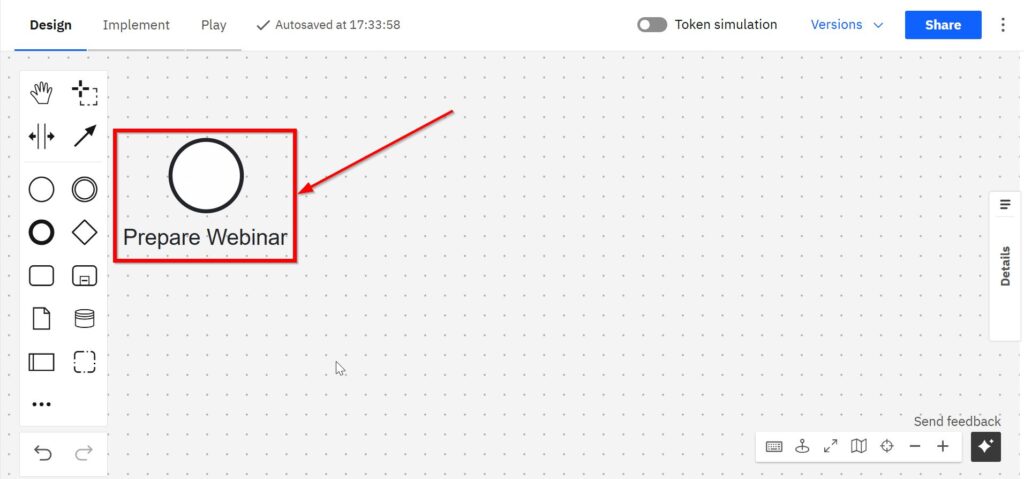
Step 1: Start the Process
The process begins with a start event named “Prepare Webinar.”
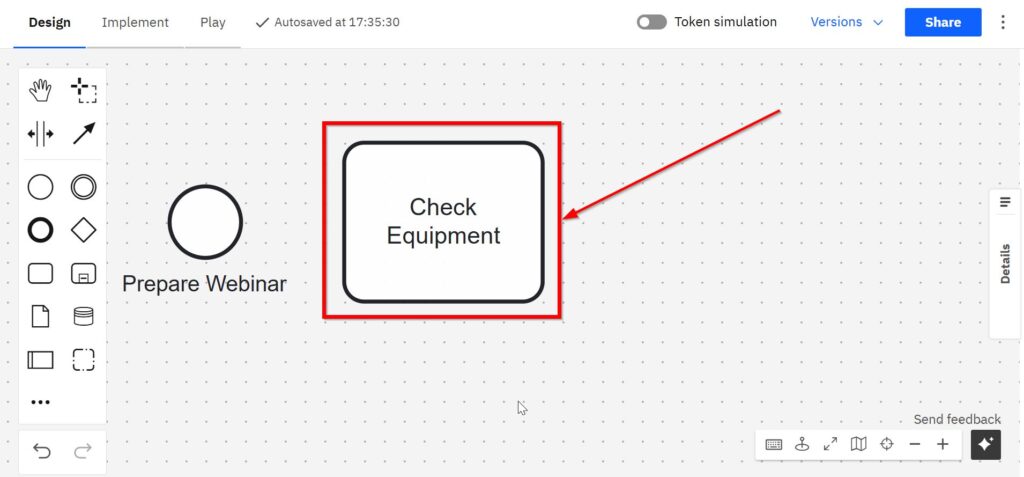
Step 2: Plan and Organize
A user task follows, where the team performs “Check Equipment.” This ensures that the setup is ready before going live.
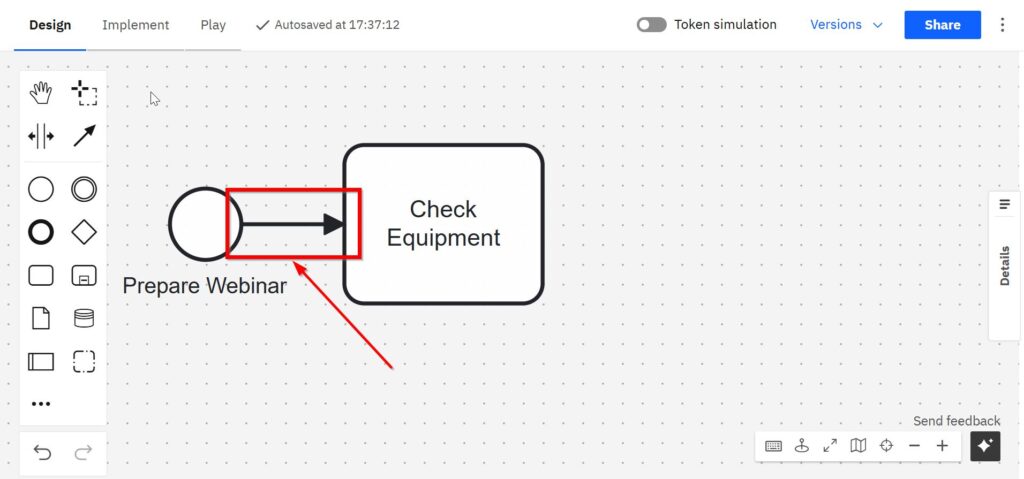
Sequence flows connect the elements.
Step 3: Broadcast a Signal (Intermediate Throw Event)
Once the preparation is complete, a signal intermediate throw event named “Broadcast: Webinar Ready” is triggered.
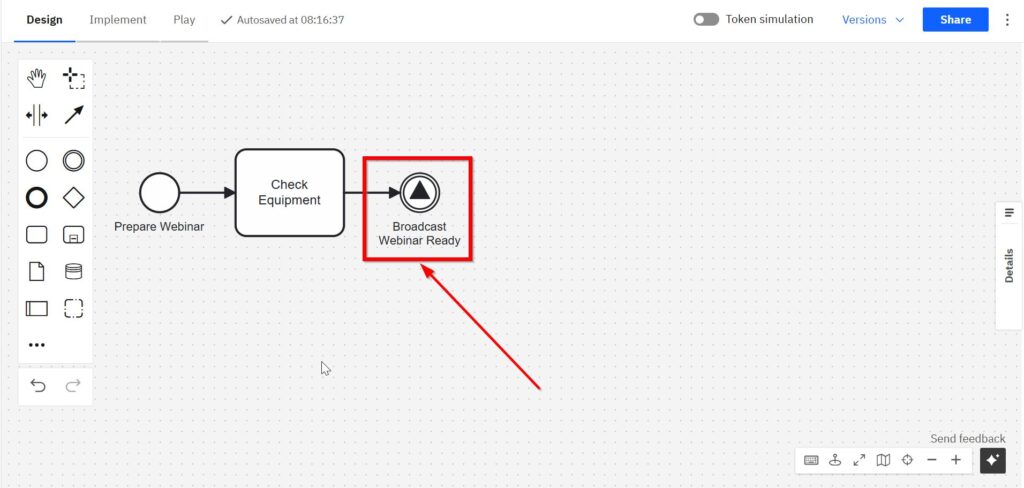
- This signal announces that the webinar is ready to start.
- Any process or task waiting for this signal—inside the same process or in another process—can react to it.
Step 4: Wait for the Start Signal (Intermediate Catch Event)
Somewhere else in the process, a signal intermediate catch event waits for this broadcast. It is labeled “Wait for Start Signal.”
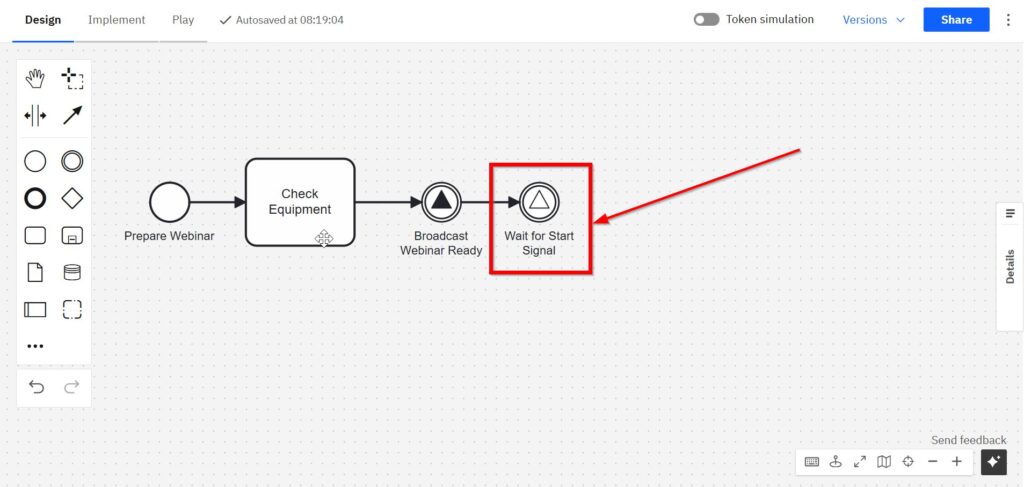
- When the broadcast is received, the next activities are triggered.
- This shows how a catch event “listens” for a signal and activates when the signal arrives.
Step 5: Run and Finish
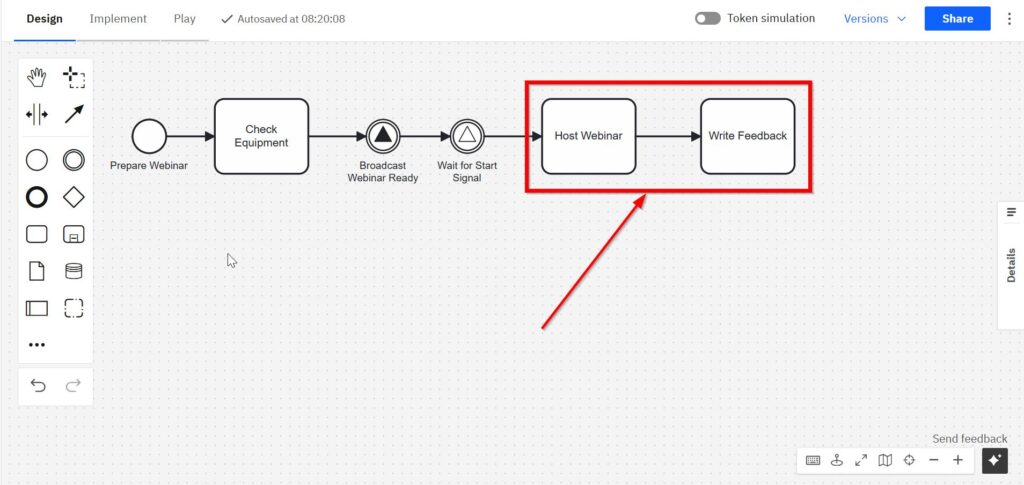
The team now carries out the main task “Host Webinar.” Afterward, a service task “Write Feedback” is executed to record results.
step 6: end the process
The process then ends with a signal end event named “Signal: Feedback Published.”
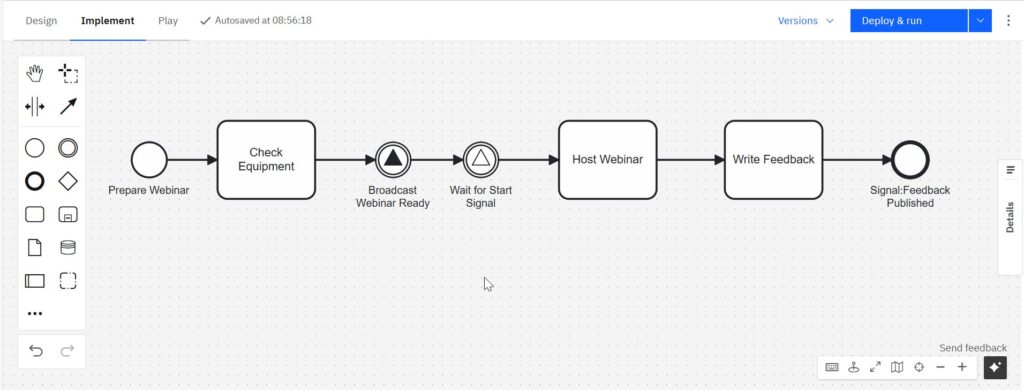
- This broadcasts another signal that feedback has been published.
- Other processes can also listen for this signal and continue accordingly.
Optional: Non-Interrupting Boundary Signal Event
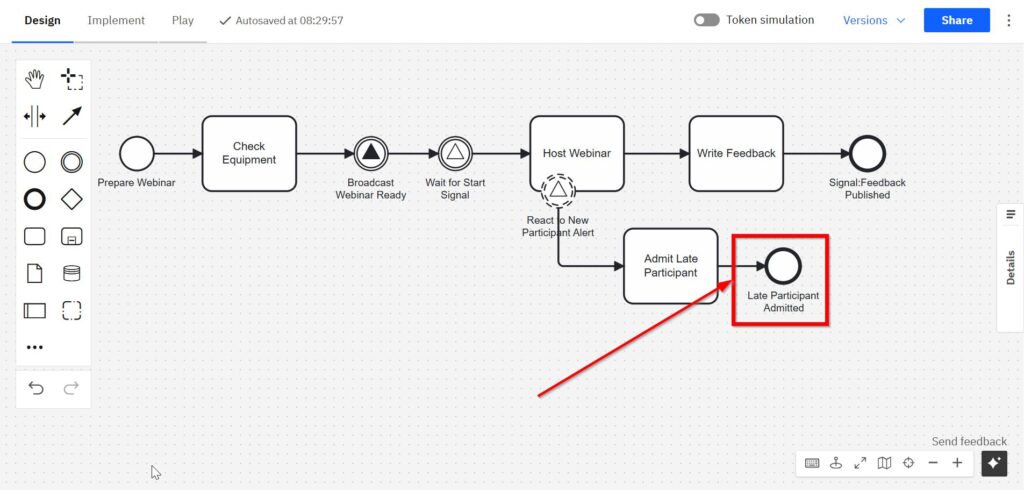
Sometimes, signals are used to react to additional events without interrupting the main task. For example, during “Host Webinar,” a non-interrupting signal boundary event could be attached.
- It is labeled “React to New Participant Alert.”
- This event starts a parallel task, such as “Admit Late Participant.”
- The main webinar continues, while the parallel side task runs independently.
- It ends with the end event “Late Participant Admitted”.
Key Takeaways
- Signal Throw Events broadcast information to anyone listening.
- Signal Catch Events wait for a signal and activate when it arrives.
- Signal End Events close a process while sending out a broadcast.
- Boundary Signal Events can trigger parallel actions without stopping the main flow.
In short, signal events provide a powerful way to coordinate activities across processes. They allow communication without a predefined sender-receiver relationship—making processes more flexible and responsive.
Final Thoughts
The signal event in BPMN 2.0 gives me flexibility. I can send and receive signals without defining fixed connections. That’s powerful.
In this article, I explained every type of signal event. I also shared a clear example that shows how they work inside a single process.
Try modeling your next business process with signal events. You’ll see how much smoother your logic becomes.
What’s Next?
Now that I understand the basic role of BPMN in process modeling, I can look more closely at the people, systems, and organizations inside a process. This is where the participant perspective becomes important. It helps me see who takes part, who owns which responsibility, and where communication crosses process boundaries.
In the next article, The Participant Perspective in BPMN, I explore how participants shape a process model. I also show why this view helps me separate internal work from external collaboration. After that, I can continue with How to Use the Compensation Event in BPMN 2.0 to learn how BPMN models reversal logic when completed work must be corrected, canceled, or undone. Click through to see how participant views and compensation events make BPMN diagrams clearer, more structured, and more realistic for business processes.
Explore Requirements Modeling in Context
Clear requirements need more than written statements. I also need visual models that reveal relationships, behavior, and structure. In my main article on Requirements Modeling, I connect Modeling Concepts, Process Modeling with BPMN, and UML into one practical overview. This helps me compare different modeling views and choose the right approach for each requirements question.
From there, I can continue with the main article on Processes. This guide shows how Process Management, BPMN, and Camunda support practical workflow analysis and improvement. It helps me move from requirements understanding to real process clarity. Click through to see how process thinking makes work easier to analyze, discuss, and improve.
Credits: The diagrams were created with Camunda.
| Read more on Business Process Modeling and Notation (BPMN) |
|---|
| Syntax and Semantics of BPMN BPMN Project Roles for Effective BPM The Participant Perspective in BPMN BPMN Core Elements |