

Using confluence in requirements engineering helps me manage requirements with more structure and clarity. I can document needs, organize decisions, share updates, and support collaboration in one central workspace. Spaces, pages, blogs, and comments make the process easier to follow. In this guide, I show how Confluence supports better requirements work from idea to review.
What Confluence Adds to Requirements Engineering
Requirements engineering produces more than individual requirements. I also need context, decisions, meeting results, models, assumptions, and supporting documentation.
Confluence gives me one place for this knowledge.
However, I distinguish between documentation and formal requirements management. Confluence works especially well for collaboration and knowledge. For complex projects that require strict baselines, sophisticated traceability, or detailed configuration management, I may need additional tools.
I use Confluence to create shared requirements knowledge, not simply to store isolated requirement statements.
1. Structure Requirements in a Space
First, I create a clear structure for the project or product.
For example, I can organize a requirements space around:
- functional requirements,
- non-functional requirements,
- user stories,
- meeting results,
- decisions,
- and supporting documentation.
The exact structure depends on the project. Therefore, I avoid creating categories that nobody needs.
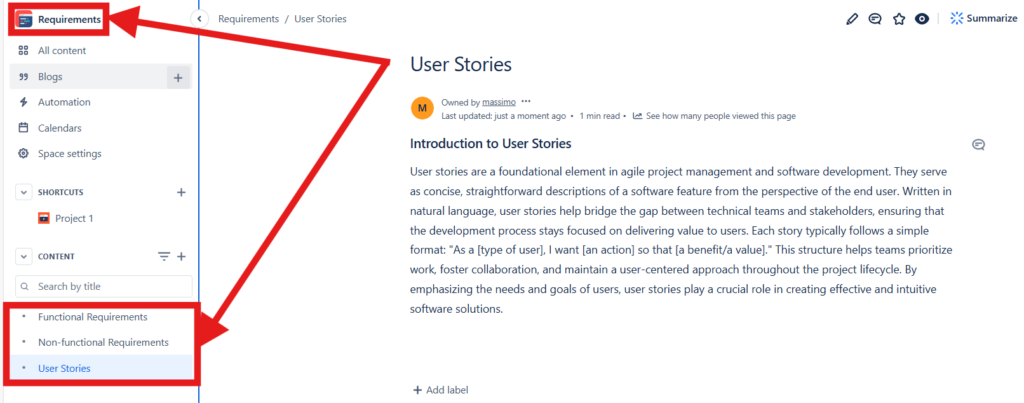
A clear page hierarchy helps stakeholders understand where requirements information belongs and where they can find it.
2. Use Pages for Stable Requirements Knowledge
I use pages for content that needs structure and continued maintenance.
For example, a page can describe a requirement group, user story, use case, business rule, or related analysis. I can also create supporting subpages where additional detail improves clarity.
Pages: The Building Blocks
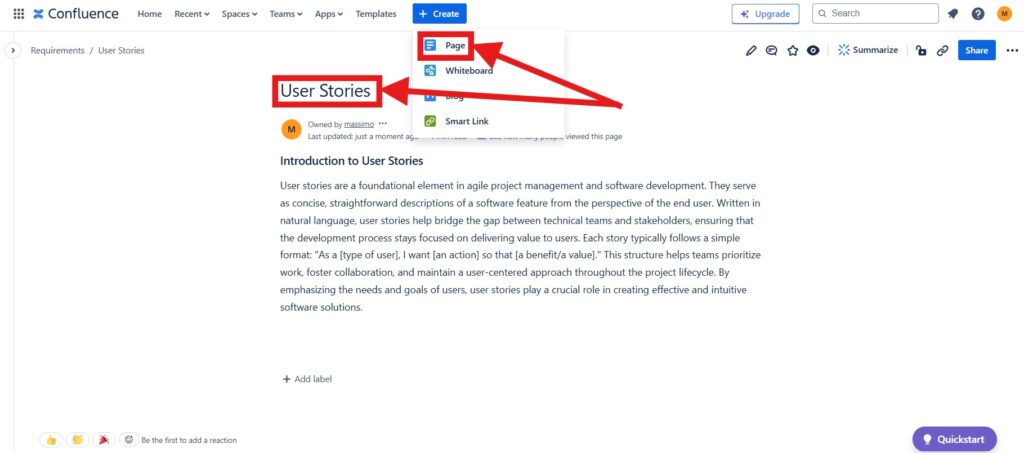
However, I do not automatically create one page for every small requirement. Large numbers of atomic requirements can become difficult to manage this way.
Instead, I choose a level that keeps the documentation understandable and maintainable.
3. Use Blogs for Requirements Updates
Requirements documentation and requirements communication serve different purposes.
I keep stable requirements knowledge on pages. In contrast, I can use blog posts for dated information such as workshop summaries, important changes, or project updates.
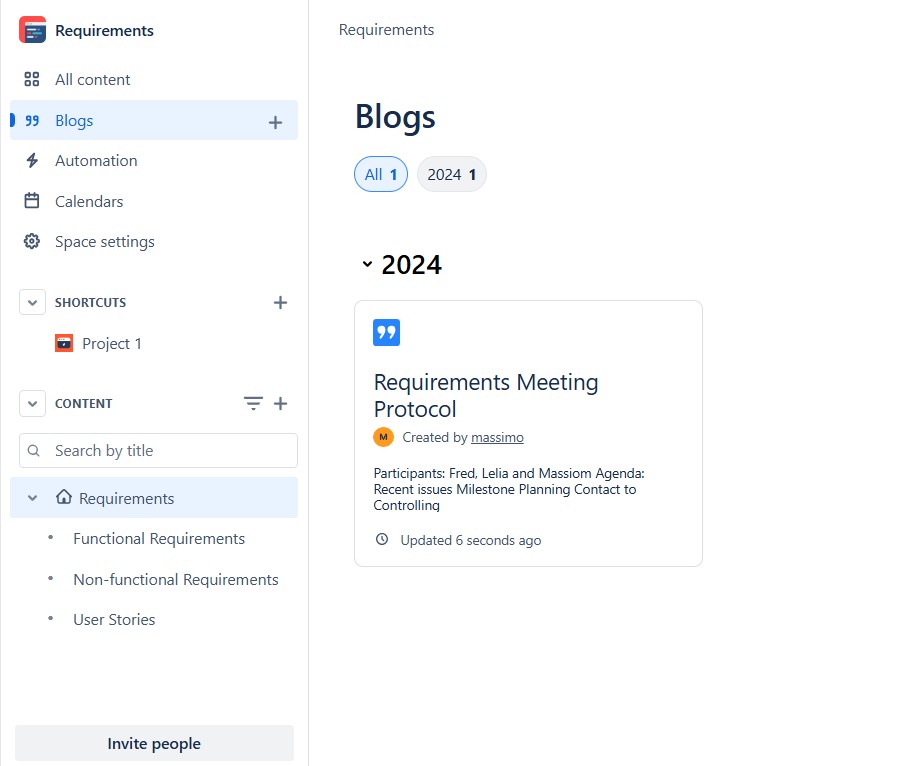
I separate durable requirements knowledge from time-based communication so that important information does not disappear inside a stream of updates.
4. Review Requirements Through Comments
Requirements need feedback.
Therefore, I use comments when stakeholders need to discuss a page or provide clarification. A comment keeps the discussion close to the information it concerns.
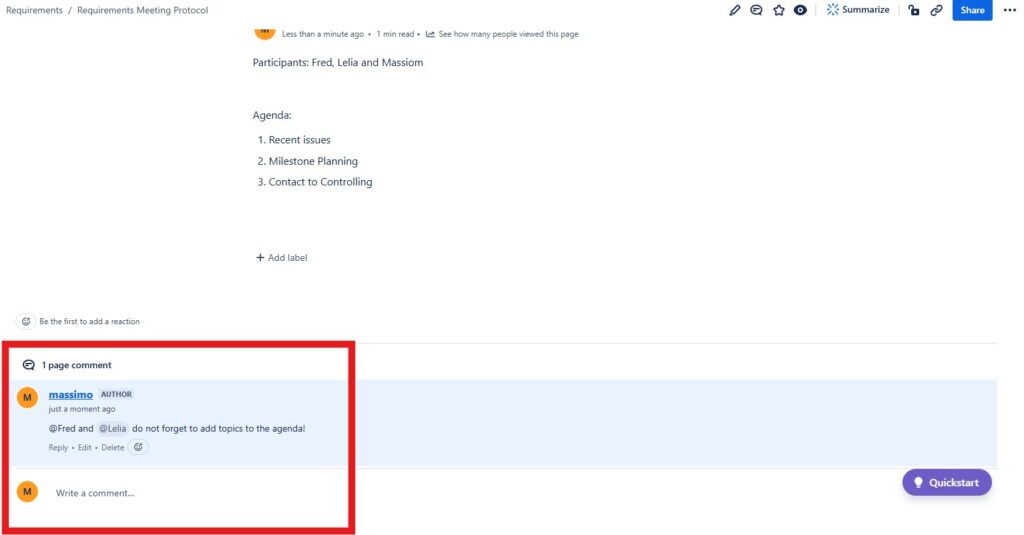
This works well for reviews because the context remains visible. Once the discussion produces a decision, however, I update the actual requirements information instead of leaving the final result only inside comments.
Comments support discussion, but the agreed result should become part of the maintained requirements documentation.
5. Turn Follow-Up Work Into Action Items
Requirements discussions often produce open questions and follow-up activities.
I can assign an action item directly on a Confluence page by mentioning the responsible person and adding a due date.
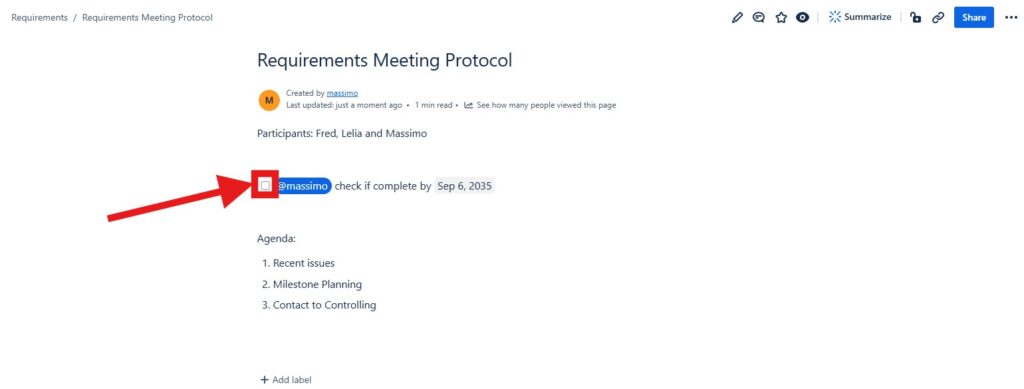
This keeps small follow-up tasks connected to their requirements context.
Assigned action items also appear in the task overview, which gives me a broader view of outstanding work.
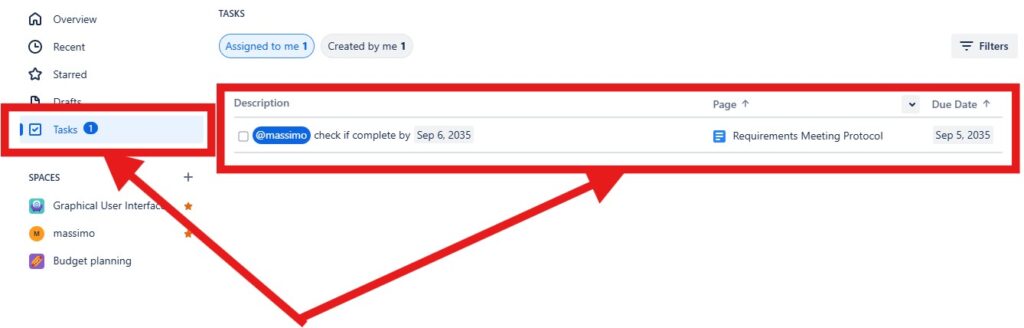
I use action items to make required follow-up visible instead of relying on meeting notes alone.
For larger implementation work, however, I prefer a dedicated work-management tool such as Jira.
6. Connect Requirements With Jira Work
Confluence and Jira serve different purposes.
I use Confluence for detailed context and collaborative documentation. Then I connect this information with Jira when implementation work needs structured tracking.
For example, I can display or link a Jira work item directly within a Confluence page.
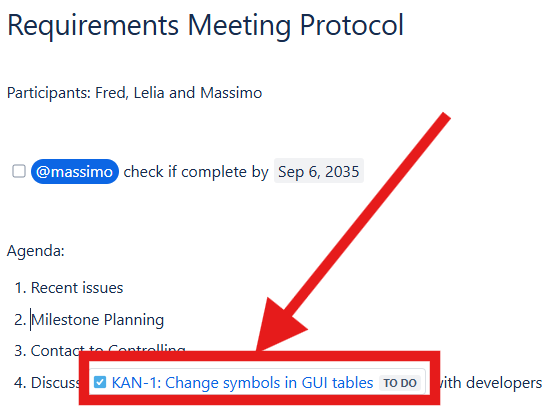
The connection between Confluence and Jira helps me link requirements context with the work that implements or addresses it.
This improves practical traceability without forcing all detailed documentation into Jira.
How I Keep Requirements Documentation Useful
Confluence becomes less valuable when pages multiply without clear ownership or structure.
Therefore, I apply a few simple rules:
- I give each space and page a clear purpose.
- I maintain a consistent hierarchy.
- I use templates when repeated structures add value.
- I document decisions instead of leaving them only in comments.
- I assign follow-up activities when action is required.
- I connect implementation work to Jira where appropriate.
- I review important pages when requirements change.
Most importantly, I avoid duplicating the same requirement across several pages.
A single maintained source is more reliable than several copies that can develop in different directions.
Where Confluence Has Limits
Confluence is flexible, but flexibility also has limits.
For smaller and medium-sized requirements environments, its pages, comments, history, and Jira integration may provide enough structure.
However, highly regulated or complex projects may require stronger capabilities for individual requirement versioning, baselines, formal approval states, relationship models, change control, or automated traceability.
Therefore, I decide based on the requirements process rather than forcing every project into the same tool.
Confluence is strongest as a collaborative requirements knowledge platform, while specialized requirements tools provide stronger control when formal requirements management becomes necessary.
Conclusion
I use Confluence in requirements engineering to combine structured knowledge with collaboration.
Spaces and pages organize requirements information. Blogs communicate updates. Comments support reviews. Action items create accountability. Jira connections link requirements with delivery.
Using Confluence in requirements engineering works best when documentation, collaboration, and implementation links form one clear information structure.
For me, that is the main benefit: stakeholders can understand not only what the requirements are, but also the context, decisions, and work connected to them.
What’s Next?!
Now that you know how I use Confluence in requirements engineering, you can document requirements with more structure and clarity. Spaces, pages, blogs, and collaboration features help me keep important information in one place. However, requirements work becomes even stronger when I prepare pages for validation.
In the next article, I’ll show you How to Structure a Confluence Page for Requirements Validation. You’ll learn how a clear page structure supports reviews, feedback, and better stakeholder discussions. Click the next article to make your requirements validation work more focused and effective.
Connect Requirements Engineering with Practical Tools
Requirements engineering becomes clearer when I use tools that support analysis, documentation, tracking, and process modeling. In my main article on Requirements Engineering Tools, I show how draw.io, Confluence, Jira, and Camunda help me work with more structure. Draw.io helps me visualize ideas. Confluence helps me document and validate requirements. Jira helps me track work. Camunda helps me model processes. Click through to the full article and learn how these tools support better requirements from idea to implementation.
| Read more about Confluence and How to |
|---|
| Use shortcuts in Confluence Assign a task in Confluence Create a Confluence space from a template Delete a Page in Confluence Create a Confluence page |