
![Cropped UML class box titled “Person” listing attributes including “/Age,” “Date of birth [0..1],” and “Client: boolean,” with a dashed «refines» arrow partially visible.](https://the-requirements-engineer.com/wp-content/uploads/2025/08/tipsUmlMod1-1-optimized.jpg)
When working on software projects, applying the right Tips for Requirements Modeling with UML can make all the difference. In my experience, effective modeling depends on clarity, structure, and communication. Using UML diagrams helps visualize complex requirements and align stakeholders. In this article, I’ll share my best Tips for Requirements Modeling with UML, offering practical strategies to make your modeling process more efficient, consistent, and easy to understand.
Combine UML with textual requirements
UML diagrams can communicate structure very efficiently. However, they do not always express business rules clearly enough.
Therefore, I add textual requirements when they make a rule easier to understand.
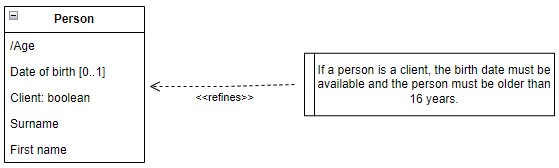
For example, I can model a Person with attributes such as Date of birth and Client. I can then attach a requirement stating that a client must have a known birth date and satisfy a minimum-age rule.
I use text when a sentence communicates a requirement more clearly than additional UML notation.
This approach keeps the diagram compact. At the same time, it connects the business rule directly to the relevant model element.
Use stakeholder language precisely
A requirements model only works when stakeholders interpret its terms consistently.
For example, the word “request” can describe several things:
- a blank form,
- a submitted form,
- stored request data,
- or the resulting business case.
If I represent all of them as Request, I create ambiguity.
Therefore, I identify the actual concepts and name them accordingly. Depending on the domain, I might distinguish Request Form, Submitted Request, and Request Case.
I give different business concepts different names, even when stakeholders use the same informal term for them.
This improves both the diagram and the surrounding requirements.
Use stereotypes selectively
UML stereotypes can add project-specific meaning. However, I do not use them simply because two concepts differ.
Usually, clear names provide the better solution.
I use stereotypes when I need a recurring classification that standard UML does not express well.
A stereotype should add useful semantics rather than compensate for unclear naming.
As a result, the model remains easier to understand for stakeholders who know the business domain but not every UML extension.
Distinguish multiplicity from string length
Multiplicity and data length describe different requirements.
For example, a multiplicity of 0..1 means that an attribute can contain no value or one value. It does not mean that the text may contain one character.
Similarly, a maximum surname length of 40 characters is a constraint on one value. It does not mean that a person can have 40 surnames.
Multiplicity defines how many values may exist. A length constraint defines the permitted size of one value.
Therefore, I avoid notation that can confuse these concepts.
If a length restriction matters at requirements level, I define it explicitly or use an appropriate data type.
However, I also check why the restriction exists. A 40-character maximum might be a real business rule. Alternatively, it might only come from an existing database field.
I model the first as a requirement. I normally exclude the second from a requirements model.
Model optional information correctly
Multiplicity becomes especially useful when information is optional.
In the example, Date of birth has a multiplicity of 0..1. Therefore, a Person may exist without a recorded birth date.
However, the additional requirement says that the birth date becomes mandatory when the person is a client.
This distinction matters.
If I simply changed Date of birth to mandatory for every Person, I would create a stronger requirement than the business rule actually demands.
I model conditional requirements as conditional requirements instead of turning them into unconditional restrictions.
This prevents seemingly small modeling decisions from changing the intended business logic.
Use derived attributes deliberately
The slash before /Age indicates a derived attribute in UML.
That means I calculate Age from other information instead of treating it as independent data.
For example, I can derive age from Date of birth and a reference date.
This avoids unnecessary redundancy. Otherwise, Date of birth and Age could contradict each other.
I use derived attributes when the value can be calculated reliably from authoritative information already contained in the model.
The same principle applies to totals, durations, balances, and similar calculated values.
Separate information from business rules
Attributes and constraints serve different purposes.
First name, Surname, and Date of birth describe information about a Person.
By contrast, “a client must be older than 16” describes a rule about valid information.
Therefore, I keep the domain structure and its constraints conceptually separate.
Attributes describe what information exists. Constraints describe which states or combinations of information are valid.
This separation also makes requirements reviews easier. Stakeholders can first verify the information model and then discuss the rules that apply to it.
Use OCL when greater precision adds value
Natural language usually works well for stakeholder communication. However, some requirements need greater precision.
In those cases, I can use the Object Constraint Language, or OCL.
For example, an age condition could express the idea that Client implies an Age above a defined threshold.
However, formal notation does not solve unclear business logic.
“Older than 16” means something different from “at least 16.” In addition, an age rule needs a reference date. The system might evaluate age at registration, contract start, service delivery, or another business event.
I clarify the business rule before I formalize it.
OCL then becomes useful for eliminating ambiguity or supporting model validation. I do not use it merely to make a requirements model look more technical.
Keep requirements models separate from software design
UML class diagrams can easily start to resemble database or implementation models.
I avoid this when I model requirements.
I focus first on concepts that stakeholders recognize, such as Person, Customer, Application, Contract, or Payment.
Therefore, I do not add database tables, foreign keys, persistence identifiers, or implementation classes unless they represent genuine requirements.
A requirements model should describe the required domain before it describes the chosen technical solution.
This keeps the model useful even when the implementation changes.
Model only what supports the purpose
A good diagram does not need to contain every known attribute.
If I model an age-related eligibility rule, I may need Date of birth and Client status. I probably do not need every other attribute associated with the person.
Therefore, I select information according to the purpose of the view.
Every element in a requirements model should help answer a relevant requirements question.
This keeps diagrams focused and reduces unnecessary complexity.
Use models to expose hidden assumptions
One of the greatest strengths of modeling is its ability to reveal unanswered questions.
The example immediately raises several useful questions:
- What exactly makes someone a client?
- Can a non-client have a birth date?
- When must the birth date become available?
- Does “older than 16” mean at least 16 or at least 17?
- On which date do I calculate the person’s age?
These questions often remain hidden in purely textual requirements.
A useful requirements model does not only document answers. It also exposes questions that still require decisions.
Therefore, I use UML as an analysis tool as well as a documentation tool.
Conclusion
I use UML for requirements modeling when it makes the domain easier to understand and discuss. I combine diagrams with textual requirements when necessary. In addition, I use precise terminology, correct multiplicities, derived attributes, and formal constraints where they add real value.
Good requirements modeling reduces ambiguity without adding unnecessary complexity.
That is the principle behind my most important Tips for Requirements Modeling with UML: model only what matters, use stakeholder language consistently, distinguish information from constraints, preserve conditional rules, and introduce formal precision only where the requirement actually needs it.
What’s Next?!
Now that you’ve learned practical Tips for Requirements Modeling with UML, it’s time to take the next step toward mastering system structure. In my next article, Unlocking the Power of Information Structure Modeling, I’ll show how to organize and connect information effectively within your models. Join me to discover how strong information structures create clarity, improve communication, and form the backbone of successful system design.
Make Requirements Clear with Requirements Modeling
If I want to understand requirements beyond plain text, I need models that make ideas easier to see and explain. In the main article on Requirements Modeling, I explore core Modeling Concepts, Process Modeling with BPMN, and the structural perspective of UML. Together, these topics help me visualize workflows, describe relationships, and analyze systems with more clarity. Click through to see how Requirements Modeling helps me turn complex requirements into structured, practical, and easier-to-communicate insights.
This article covers concepts that are also included in the CPRE certification syllabus.