
When I think about creating a system that runs seamlessly, one thing becomes clear — structure matters. True clarity starts with how we organize and represent data. That’s where information structure modeling comes in. It might sound complex at first, but it’s a real game-changer. By modeling information structures effectively, we turn abstract data into meaningful relationships that drive smarter design, improve communication, and make every part of the system work in harmony.
What Is Information Structure Modeling?
I use information structure modeling to describe the relevant concepts of a system and the relationships between them.
For example, a Customer Relationship Management system contains information about customers. However, listing a customer’s name, email address, and phone number is not enough. I also need to understand how the customer relates to other information.
A customer may receive a receipt. A receipt can refer to products. In addition, staff may participate in the underlying business process.
Information structure modeling shows both the relevant information concepts and the relationships between them.
From a Glossary to an Information Model
A glossary helps me define terminology. For example, I can define Customer, Receipt, Product, and Staff.
However, a glossary normally treats these terms separately.
An information model goes further. It puts the concepts into context and shows how they relate. Therefore, I can examine the structure behind the vocabulary instead of working with isolated definitions.
A glossary defines important terms, while an information model shows how those terms relate.
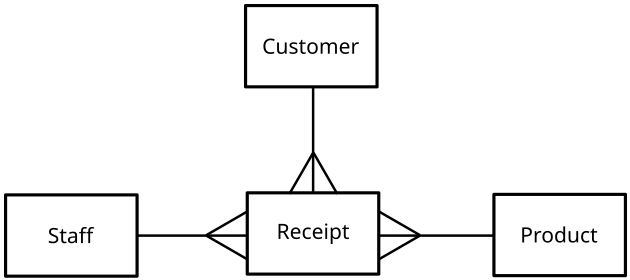
Use the first image with Customer, Staff, Receipt, and Product directly after the paragraph above.
Suggested caption:
Example of an information structure with Customer, Staff, Receipt, and Product as relevant domain concepts.
Suggested alt text:
Information structure model showing Customer, Staff, Receipt, and Product.
This is the best location because the image visually introduces the move from individual terms to a structured information model.
Entities, Attributes, and Relationships
Once I have identified the important concepts, I refine the information structure.
First, I define relevant entities or classes. Next, I identify their attributes. Finally, I specify their relationships and, where necessary, their cardinalities.
For example, a person can have a name, phone number, and email address. However, I may also need to distinguish different types of people and connect them with other information such as addresses.
Relationships are particularly important because they often represent business rules.
The value of an information model lies not only in its concepts, but also in the rules that connect those concepts.
Using UML Class Diagrams
I often use UML class diagrams for information structure modeling.
Classes represent relevant concepts. Attributes describe their properties. Associations connect related concepts. In addition, generalization allows me to represent common and specialized concepts without repeating the same information.
This makes class diagrams useful during requirements analysis. However, I keep them at the conceptual level.
A UML class diagram used for information structure modeling does not automatically define the later software design.
I model the required information structure first. I leave unnecessary implementation decisions to the design stage.
A Concrete UML Class Diagram Example
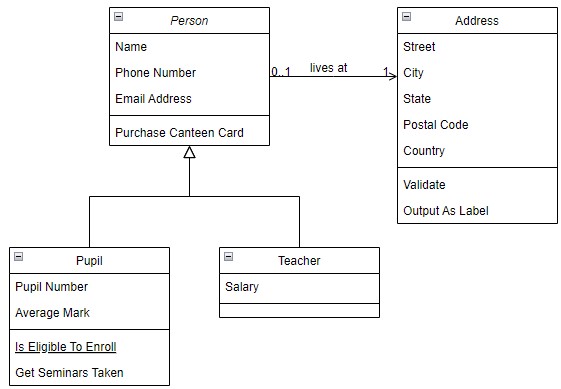
The following example contains four classes: Person, Pupil, Teacher, and Address.
Person contains the common attributes:
- Name
- Phone Number
- Email Address
It also contains the operation Purchase Canteen Card.
Pupil and Teacher specialize Person. Therefore, they inherit its common characteristics.
Pupil adds Pupil Number and Average Mark. It also contains the operations Is Eligible To Enroll and Get Seminars Taken.
Teacher adds Salary.
Address contains Street, City, State, Postal Code, and Country. It also provides the operations Validate and Output As Label.
The association between Person and Address adds another important type of information: cardinality. In the shown model, each Person relates to one Address, while an Address relates to zero or one Person.
Generalization, attributes, operations, associations, and cardinalities allow me to make domain rules explicit.
Use the image with Person, Pupil, Teacher, and Address immediately after this explanation.
Suggested caption:
UML class diagram showing Person, Pupil, Teacher, and Address with attributes, operations, generalization, and an association.
Suggested alt text:
UML class diagram with Person, Pupil, Teacher, and Address classes.
This image belongs here rather than earlier because the text now explains exactly what the reader can see in the diagram.
Information Models Help Me Find Missing Requirements
I do not use information structure modeling only to document requirements. I also use it to discover missing ones.
For example, while modeling customer information, I may discover that important relationships or attributes remain undefined.
I can then ask more precise questions:
Does every relevant concept have the required information?
Are relationships clear?
Do I know the permitted cardinalities?
Are important business rules missing?
Consequently, information modeling becomes an elicitation and validation technique.
A good information model exposes gaps that may remain hidden in textual requirements.
Connecting Information Structure With Behavior
An information model describes concepts and their relationships. However, it does not explain the complete behavior of the system.
Therefore, I often compare it with behavioral models.
For example, an activity diagram can show how users or system components perform activities. I can then examine which information those activities create, read, change, or transfer.
This provides two complementary views.
The information structure tells me what information exists. The behavioral model tells me what happens to that information.
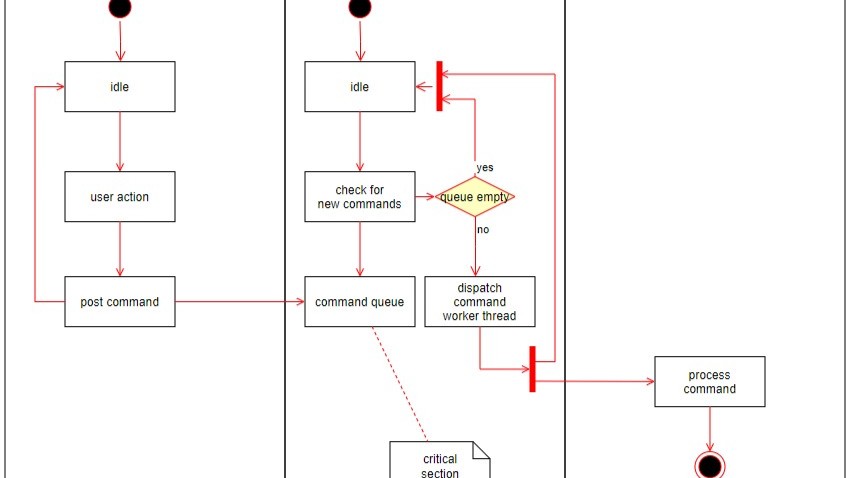
I gain a more complete requirements view when I connect information structure with system behavior.
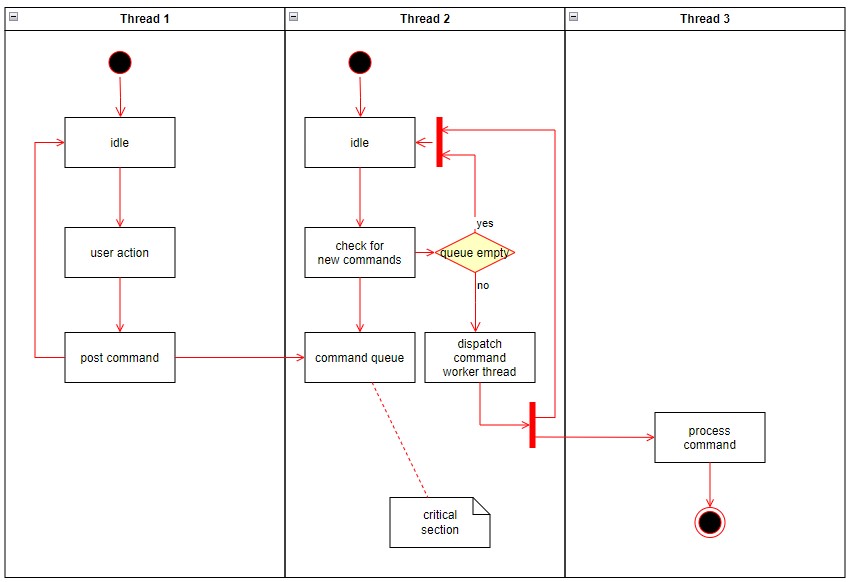
Use the activity diagram with Thread 1, Thread 2, and Thread 3 directly after the paragraph above.
Suggested caption:
Activity diagram showing behavioral flow across several threads and illustrating a behavioral perspective that complements the information structure.
Suggested alt text:
Activity diagram showing command processing across three threads.
Do not place this image in the UML class-diagram section. It represents behavior rather than information structure. Therefore, this section gives it a clear analytical purpose.
Keeping Information Models at the Right Level
Information structure models can quickly become too detailed.
Therefore, I include only concepts, attributes, relationships, and rules that support requirements analysis.
For example, I do not turn the Person, Pupil, Teacher, and Address model into a database schema. Likewise, I do not add technical implementation details unless they represent actual requirements.
This preserves the distinction between requirements and design.
I model enough structure to understand the required information, but I avoid unnecessary implementation detail.
Conclusion
Information structure modeling helps me move from isolated terms to a structured understanding of a domain.
I can start with concepts such as Customer, Staff, Receipt, and Product. Then, I can use UML class diagrams to describe more detailed structures such as Person, Pupil, Teacher, and Address. Finally, I can compare the information model with behavioral models to check how information participates in system activities.
As a result, I can identify unclear relationships, missing information, and incomplete business rules before they become design or implementation problems.
A good information structure model explains what information matters, how it relates, and which rules govern those relationships.
What’s Next?!
If I want to build a stronger foundation in UML, the next step is to understand the difference between classes and objects. That is why I continue with Understanding UML Classes and Objects: A Practical Guide. In that article, I explain how both concepts relate to each other and why they matter in requirements modeling. As a result, I can read UML diagrams with more confidence and create models that communicate ideas more clearly.
Take the Next Step with Requirements Modeling
If I want to move from written requirements to a clearer view of the whole system, I use Requirements Modeling. In the main article on Requirements Modeling, I explore Modeling Concepts, Process Modeling with BPMN, and UML to show how each perspective adds value. Therefore, I can understand flows, structures, and relationships much more easily. Click through to see how Requirements Modeling helps me turn complex requirements into visual, structured, and practical insight.
Credits: Example for an Entity Relationship Model by Pluke from Wikimedia Commons under the licence Deed – CC0 1.0 Universal – Creative Commons,
This article covers concepts that are also included in the CPRE certification syllabus.