
What is process modeling? It means visually mapping workflows so teams can understand, analyze, and improve them. It helps organizations find inefficiencies, reduce errors, and improve coordination. Therefore, process modeling creates a strong foundation for clearer responsibilities, better operations, and future automation.
What Is Workflow Process Modeling?
I use workflow process modeling to create a visual representation of how work moves through a business process.
A model can show activities, decisions, dependencies, handovers, participants, and events. As a result, I can see how individual tasks contribute to the final process result.
This is different from describing each task separately. A process model shows the relationships between those tasks.
Workflow process modeling shows how work moves from a defined starting point to a defined result.
For example, one department may complete its task correctly. However, the complete process can still fail because another department receives information too late. Therefore, I always look at the complete flow.
Why I Model Processes End to End
Organizations often divide work into departments. However, business processes usually cross those boundaries.
Employee onboarding can involve HR, IT, a manager, a mentor, and the new employee. Similarly, a leave request can involve an employee, a manager, and HR.
Each participant sees only part of the work. In contrast, the process model shows me the complete workflow.
Therefore, I ask several basic questions:
- Where does the process start?
- What result should it produce?
- Which activities must take place?
- Where does responsibility change?
- Which activities depend on other activities?
- Where can work wait or fail?
- Where does the process end?
The end-to-end view helps me improve the whole process instead of optimizing isolated tasks.
How Process Management Uses the Model
Process modeling and process management belong together, but they are not the same thing.
I use process modeling to make the workflow visible. Then I use process management to control, measure, and improve that workflow.
In practice, I usually:
- define the intended process result,
- understand the current workflow,
- model the activities and dependencies,
- identify problems,
- improve the process,
- measure the result.
Therefore, documentation is not my final objective. It gives me a foundation for improvement.
A process model becomes especially useful when I can use it to find delays, unclear responsibilities, unnecessary approvals, repeated work, or weak handovers.
How BPMN Supports Workflow Process Modeling
I often use Business Process Model and Notation, or BPMN, when I need a structured process model.
BPMN gives me standardized elements for activities, events, decisions, participants, and flows. Therefore, I can represent more than a simple sequence of tasks.
For example, I can show:
- where the process starts and ends,
- which activities follow each other,
- where a decision creates different paths,
- where alternative paths join again,
- which activities depend on previous activities.
However, BPMN is only the modeling language.
BPMN helps me describe a process, while process management helps me analyze and improve it.
Example 1: Employee Leave Request
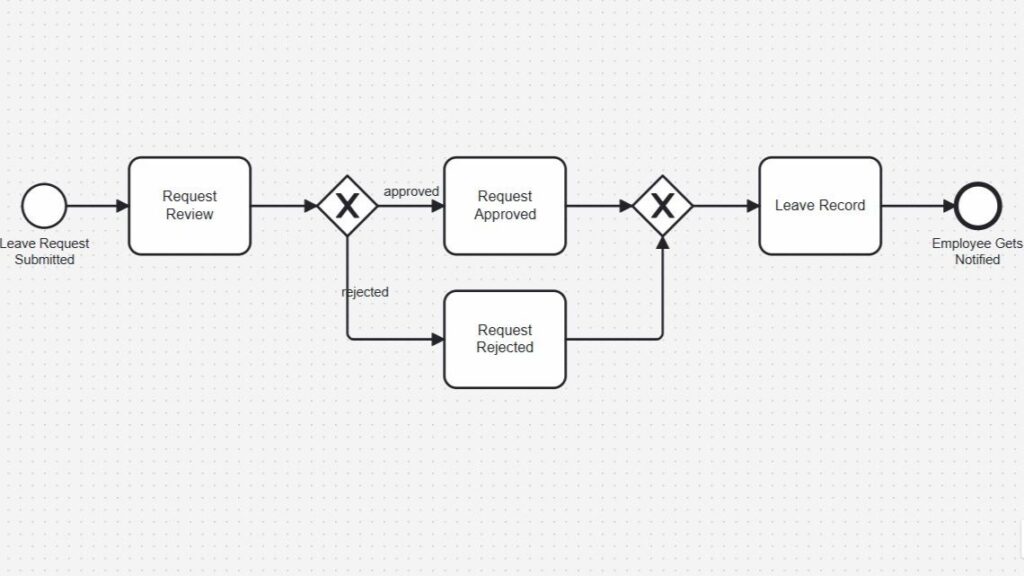
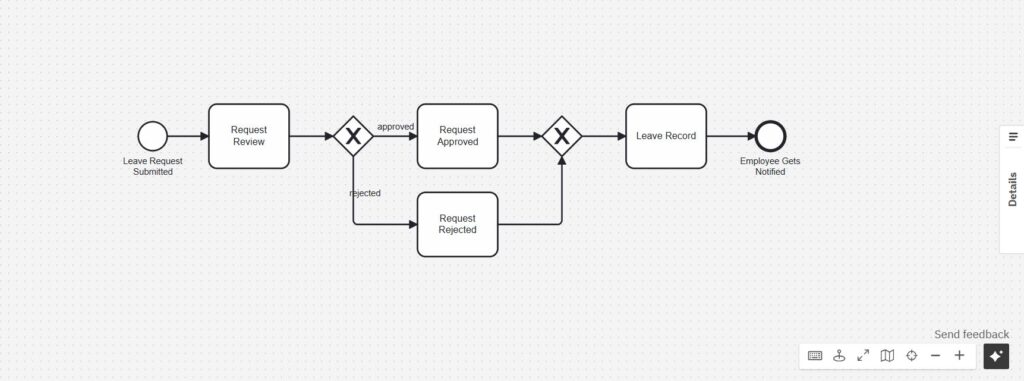
A leave request provides a simple example of workflow process modeling.
The process starts when an employee submits a leave request. Next, the manager reviews it. The process then reaches a decision point.
If the manager approves the request, the workflow follows the approved path. If the manager rejects it, the workflow follows the rejected path.
Afterward, the alternative paths join again. The leave information can then be recorded, and the employee receives a notification.
The model immediately shows something that a written description can hide: one decision creates two different paths before the process continues.
Therefore, I can use the diagram to discuss questions such as:
- Who makes the decision?
- What information does the manager need?
- What happens after a rejection?
- Where do both paths join again?
- When does the employee receive the final notification?
Example 2: Employee Onboarding
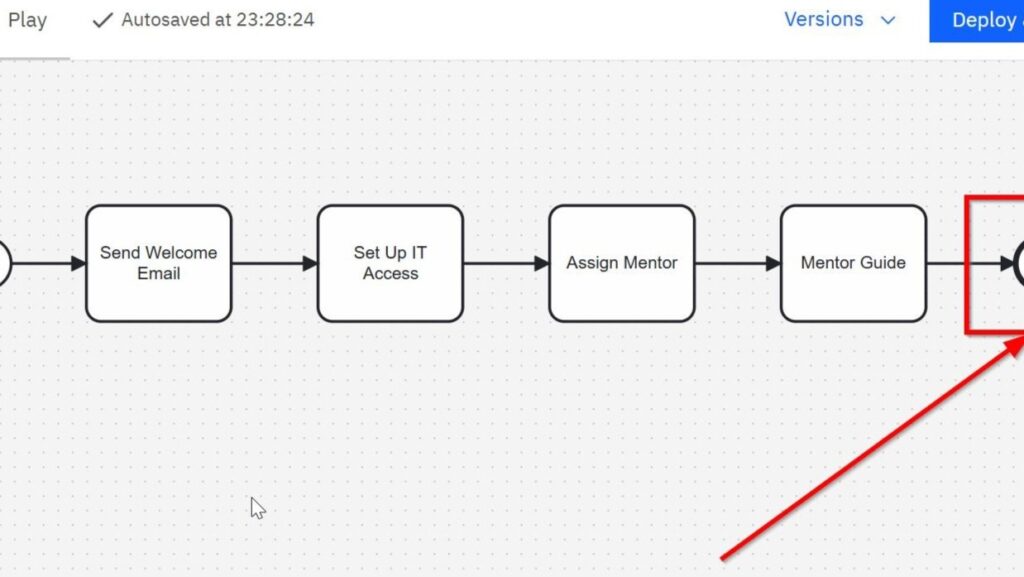
Employee onboarding shows another type of workflow.
In this example, HR sends a welcome email. Next, IT sets up system access. The organization assigns a mentor. Then the mentor guides the new employee. Finally, the process reaches its end.
At first, this looks like a simple sequence.
However, even a short workflow can contain important dependencies. IT may need employee data from HR before creating access. Likewise, the mentor may need confirmation that the employee can use the required systems.
Therefore, one delayed activity can affect several later activities.
A process model makes these dependencies visible before they turn into operational problems.
The model also helps me ask whether the sequence reflects reality. For example, could IT access preparation start earlier? Could mentor assignment happen at the same time? Does one activity unnecessarily wait for another?
These questions turn a basic diagram into a tool for process analysis.
What I Look for in a Workflow Model
Once I understand the process flow, I start looking for weaknesses.
First, I examine handovers. A handover occurs when work or information moves from one person, team, or system to another. These points often create waiting time or missing information.
Next, I look for bottlenecks. A bottleneck limits the performance of the complete process because work cannot move forward quickly enough.
I also look for:
- repeated work,
- unnecessary approvals,
- unclear responsibilities,
- manual data transfers,
- unnecessary waiting,
- unclear decisions,
- activities with no clear contribution to the result.
However, I do not remove an activity simply because it takes time.
Some activities provide control, quality assurance, security, or compliance. Therefore, I first ask why the activity exists.
Process improvement means removing unnecessary work without removing necessary control.
Measuring Process Performance
A diagram alone does not tell me whether a process performs well.
Therefore, I combine the model with suitable measurements.
Depending on the process, I may examine:
- processing time,
- waiting time,
- error rates,
- rework,
- costs,
- deadline compliance,
- customer satisfaction,
- employee satisfaction.
However, I avoid relying on one metric alone.
For example, a faster process is not automatically better. If faster processing causes more errors, the overall result may become worse.
Therefore, I measure performance against the intended process outcome.
Improving a Process Before Automating It
Automation can make a process faster. However, I do not start with automation.
First, I understand the existing workflow. Then I remove unnecessary complexity.
For example, a process may contain three approvals. Automating all three approvals can reduce processing time. However, if the process only needs one approval, removing two steps creates a greater improvement.
After simplification, automation can help me:
- transfer information automatically,
- trigger notifications,
- apply defined rules,
- reduce manual data entry,
- connect systems,
- improve consistency.
I prefer to simplify a process before I automate it.
Otherwise, automation may only make an inefficient process run faster.
Why Workflow Process Modeling Matters
Workflow process modeling gives me a common view of how work actually moves through an organization.
It connects activities, decisions, responsibilities, systems, and outcomes. Therefore, I can detect problems that remain hidden when I examine individual tasks separately.
The leave request example shows how decisions create alternative paths. The onboarding example shows how a simple sequence can contain important dependencies.
Together, both examples demonstrate the main purpose of process modeling: I make the workflow visible so that I can understand it before I try to improve it.
A useful process model does more than document work. It helps me understand, analyze, control, and improve how an organization produces results.
What’s Next
Now that I have introduced process modeling, I can place it inside the larger process lifecycle. A model becomes more useful when I connect it with design, analysis, execution, and improvement. Therefore, the next step is to understand how process work develops over time.
Read Design and Analysis in the Business Process Lifecycle next. In that article, I explain how design and analysis help me shape better workflows before implementation starts. As a result, you can understand how careful process thinking supports clearer decisions, fewer weak points, and stronger business outcomes.
Management Turns Process Design into Business Value
Read Management to see how I connect business goals, requirements, services, and processes in one practical overview. In the main article, I explore Management, Requirements Management in the IREB CPRE context, and Process Management in the BPMN context. Therefore, you can understand how process design and analysis fit into a broader management approach. As a result, management helps you create clearer workflows, stronger services, and better long-term decisions.
Read Processes to see how I connect Process Management, BPMN, and Camunda in one practical overview. In the main article, I show how process management guides design and analysis, how BPMN makes workflows visible, and how Camunda supports BPMN modeling as a practical tool. Therefore, you can understand how process ideas become clear models for discussion and improvement. As a result, processes help you design better workflows, analyze real operations, and support stronger business decisions.
Credits: The diagrams were created with Camunda.