
When I started modeling processes, I learned that the what is not enough. I also need to show the who. That is why I use BPMN Lanes in Camunda. Lanes assign tasks to people, teams, departments, or systems. As a result, my process models become clearer, more practical, and easier to discuss. In this guide, I show you how to use them step by step.
What Are BPMN Lanes?
I use lanes to divide a BPMN participant into meaningful areas of responsibility. For example, a lane can represent a role, team, department, organizational unit, or system.
A lane does not create a separate process. Instead, it organizes activities inside the same participant.
I use BPMN lanes when I want to make responsibility visible without interrupting the process flow.
Sequence flows can therefore cross lane boundaries. This makes lanes especially useful when work moves from one responsible role to another.
Pools and Lanes in BPMN
I distinguish clearly between pools and lanes.
A pool represents a participant in a BPMN collaboration. A lane divides that participant into responsibilities.
For example, I might create one pool for an organization and then create lanes for Sales, Finance, and Customer Service.
Pools separate participants, while lanes separate responsibilities within a participant.
This distinction becomes important when I model external parties. For the simple interface demonstration below, I use the labels Customer and Support Team as lanes inside one pool. However, that does not fit every real process.
If the customer represents an independent external participant, I model the customer as a separate pool and use message flows between the participants.
That approach preserves the intended BPMN semantics.
How I Create BPMN Lanes in Camunda
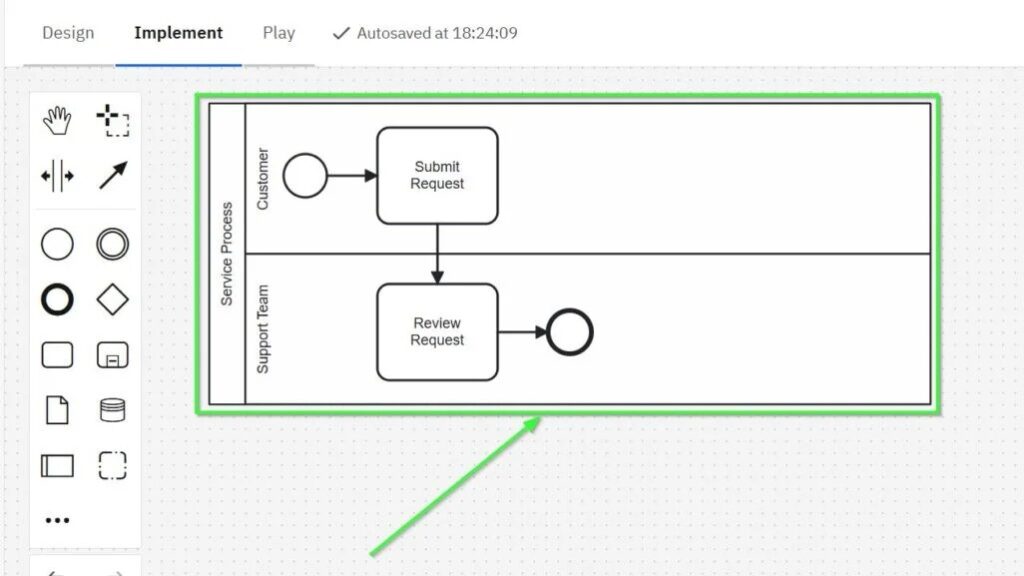
For this example, I create a small service process. It contains two responsibilities:
- Customer
- Support Team
The process itself remains simple:
Start → Submit Request → Review Request → End
This allows me to focus on the lane structure rather than complicated process logic.
Step 1: Add a Pool
First, I open a BPMN diagram in Camunda Modeler. Then I select the participant or pool element from the modeling palette.
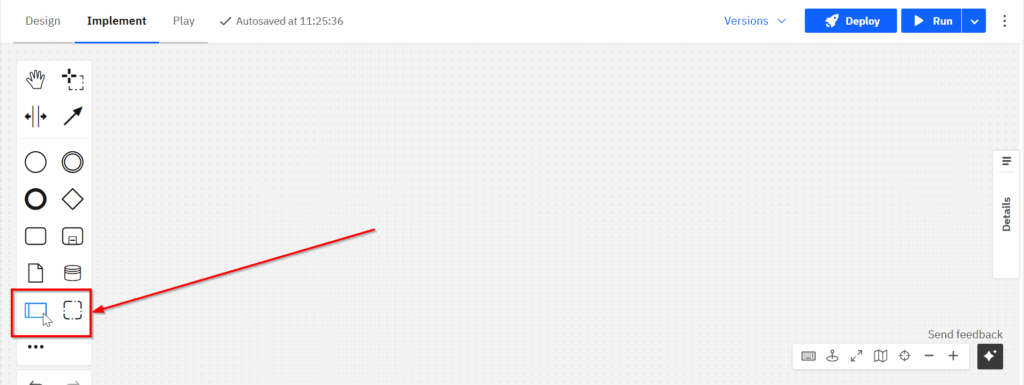
Next, I place the pool on the canvas.
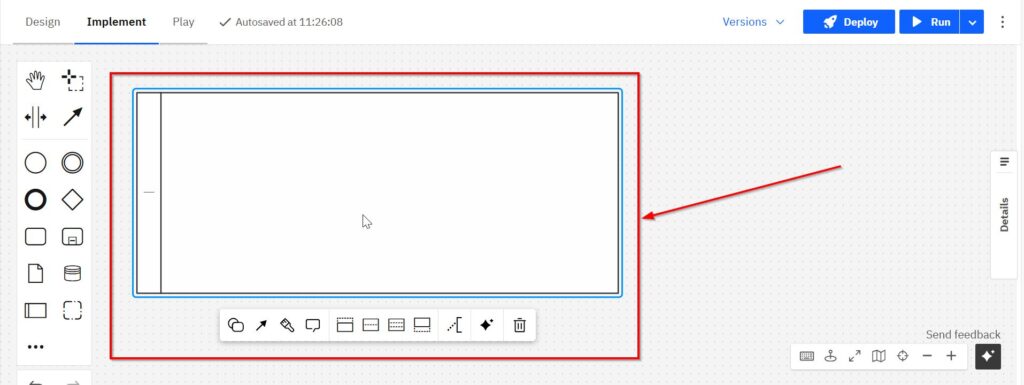
The pool defines the boundary of the process participant.
Step 2: Name the Pool
Next, I give the participant a meaningful name. In this example, I call it Service Process.
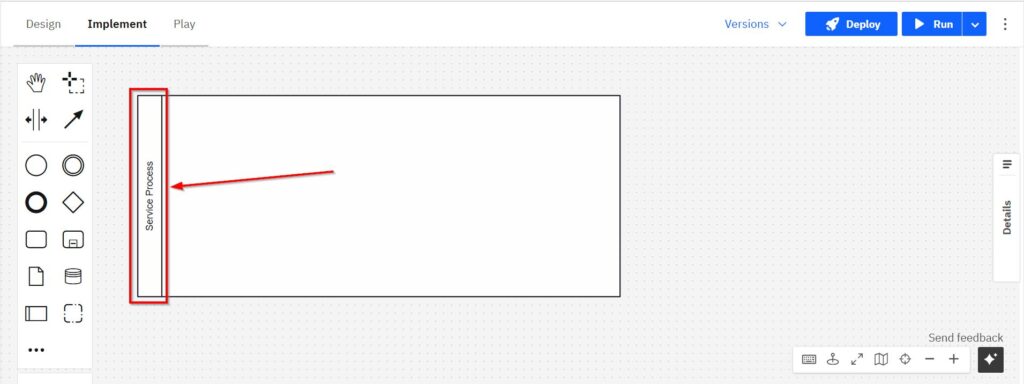
I prefer descriptive names because they make the scope of the diagram immediately clear.
Step 3: Divide the Pool into Lanes
Now I divide the participant into two lanes. I select the pool and use the lane controls in the context menu.
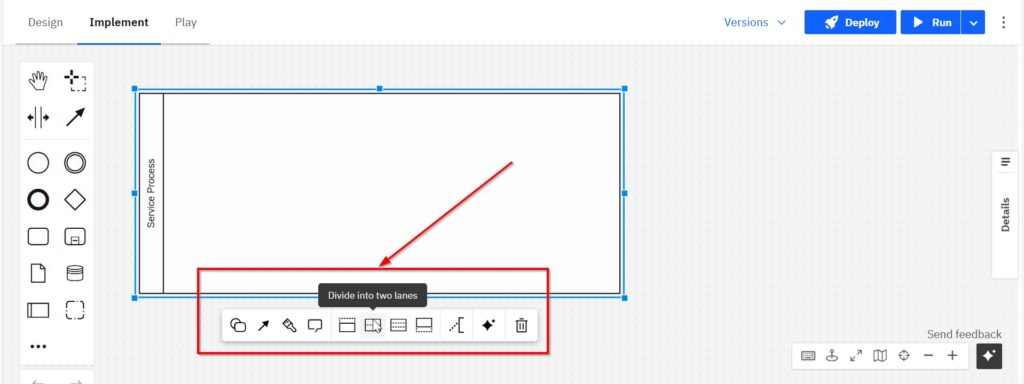
Camunda creates the lane boundary inside the existing participant. I then name the upper lane Customer and the lower lane Support Team.
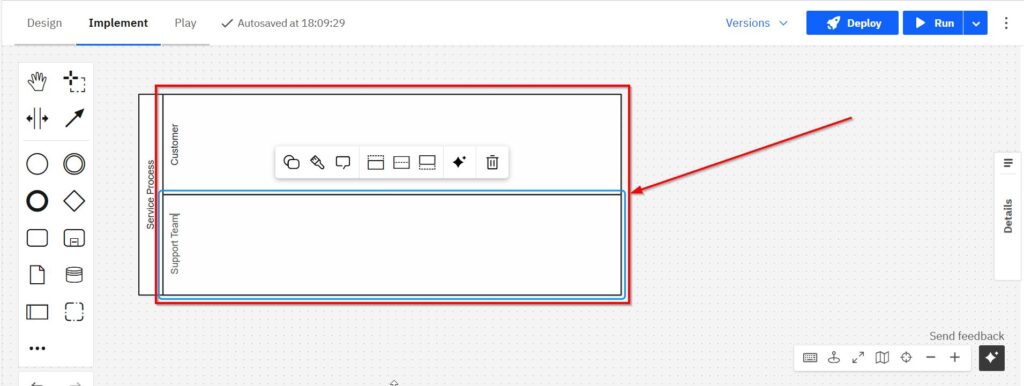
I name lanes after responsibilities rather than individual activities because a lane explains who performs the work, not what the work is.
This distinction keeps the model easier to read and maintain.
Step 4: Add the Start Event
Next, I add a start event. I select the start event symbol from the palette.
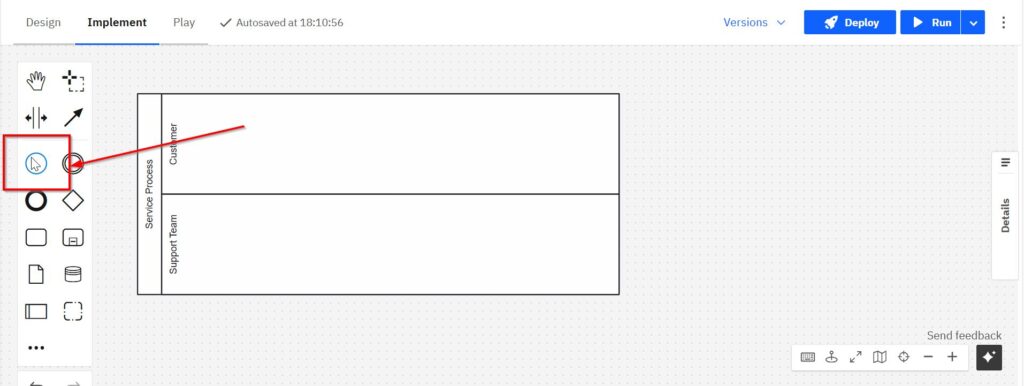
Then I place the event in the Customer lane because the customer starts this simplified process.
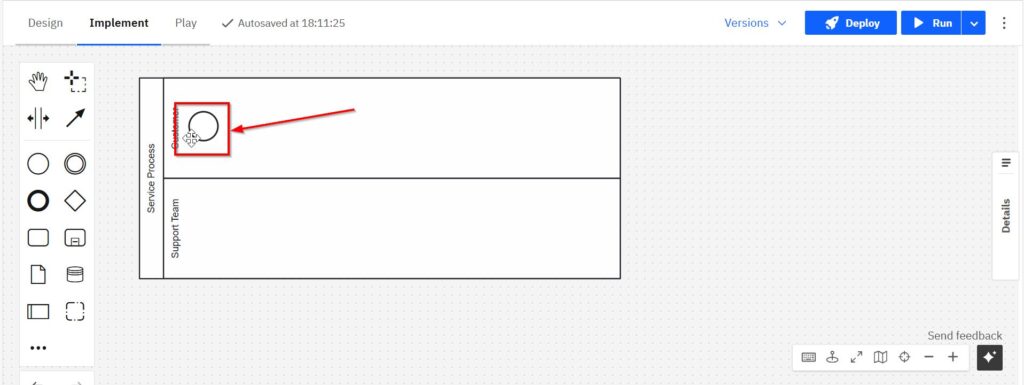
The start event defines where the process begins.
Step 5: Add the Tasks
I now add the activities. First, I select the task element from the modeling palette.
The start event defines where the process begins.
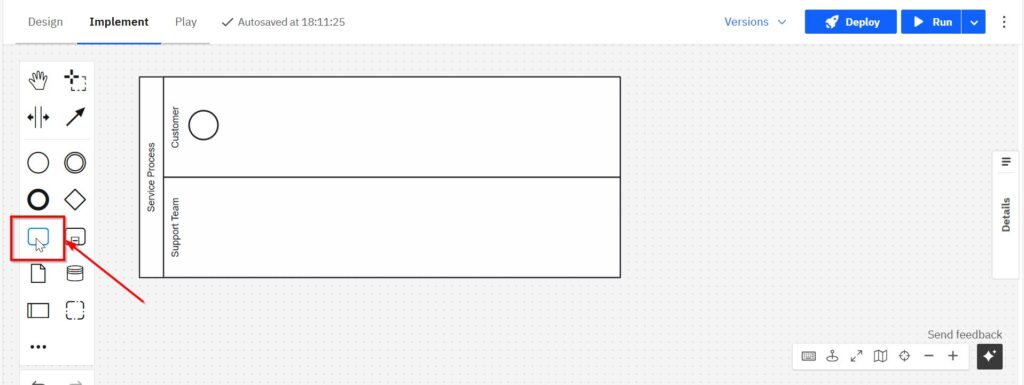
Then I create two tasks:
- Submit Request in the Customer lane
- Review Request in the Support Team lane
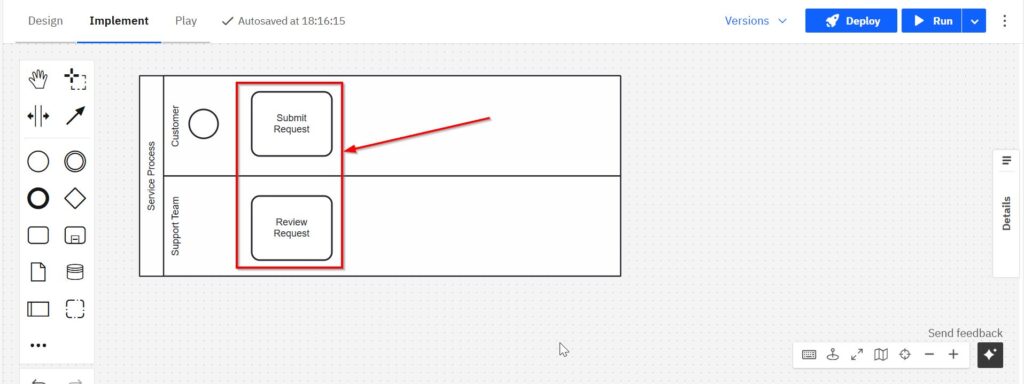
The lane position now communicates responsibility without requiring additional labels on every connection.
When an activity changes lanes, I can immediately see that responsibility moves to another role or organizational unit.
Step 6: Add the End Event
After the support team reviews the request, the simple process ends. Therefore, I select an end event.
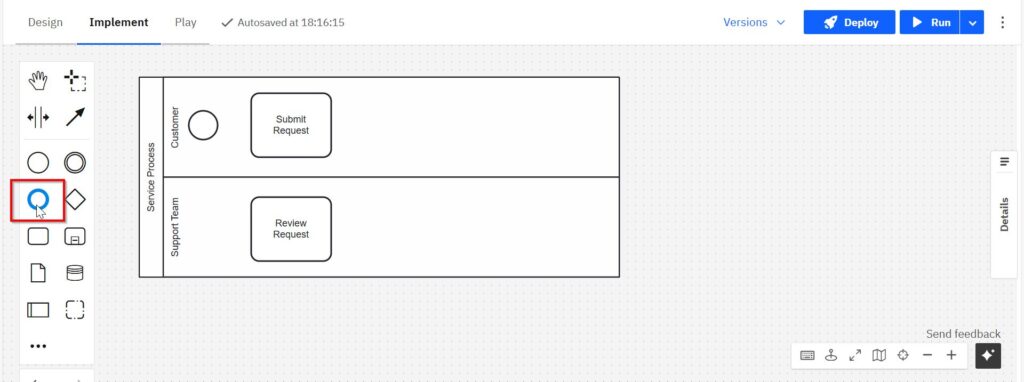
I place the end event after Review Request in the Support Team lane.
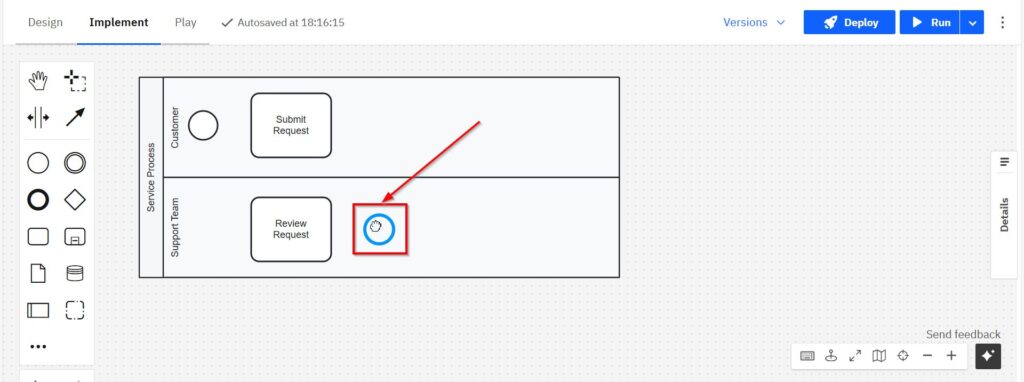
The diagram now contains all required flow nodes. However, they are not yet connected.
Step 7: Connect the Process with Sequence Flows
Finally, I connect the elements with sequence flows.
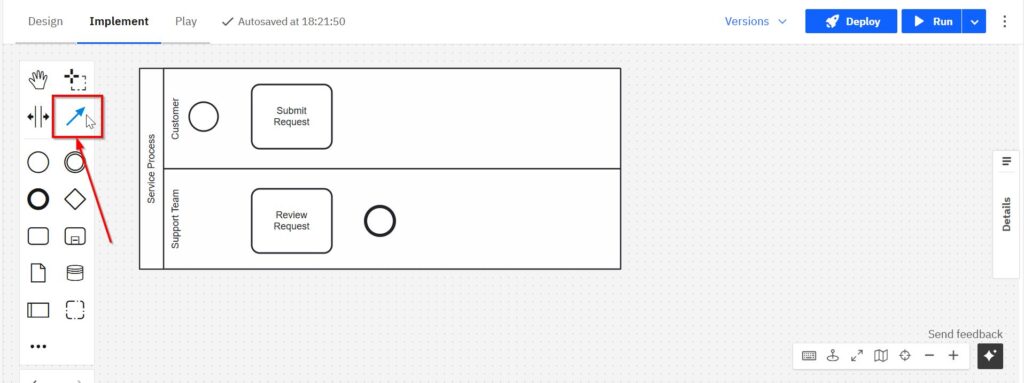
I create this sequence:
Start → Submit Request → Review Request → End
The sequence flow between Submit Request and Review Request crosses the lane boundary. That is valid because both lanes belong to the same participant.
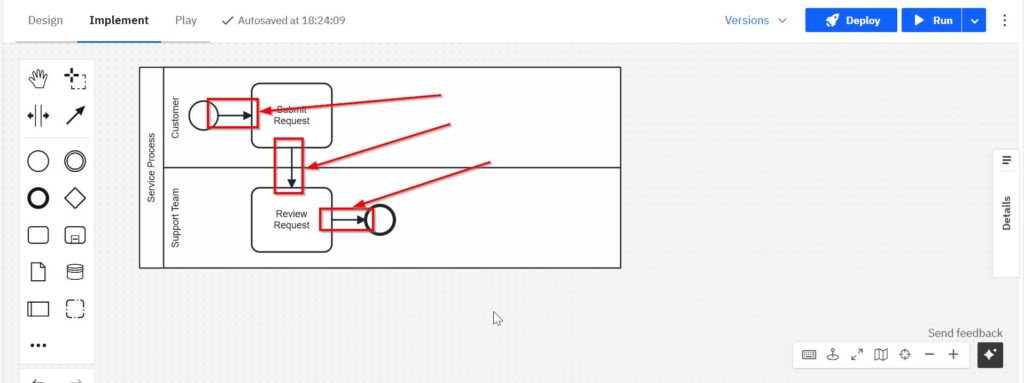
A sequence flow may cross lane boundaries, but it must not cross from one pool into another pool.
If I need communication between separate participants, I use message flows instead.
The Completed BPMN Lane Model
The finished model shows both the process sequence and the division of responsibility.
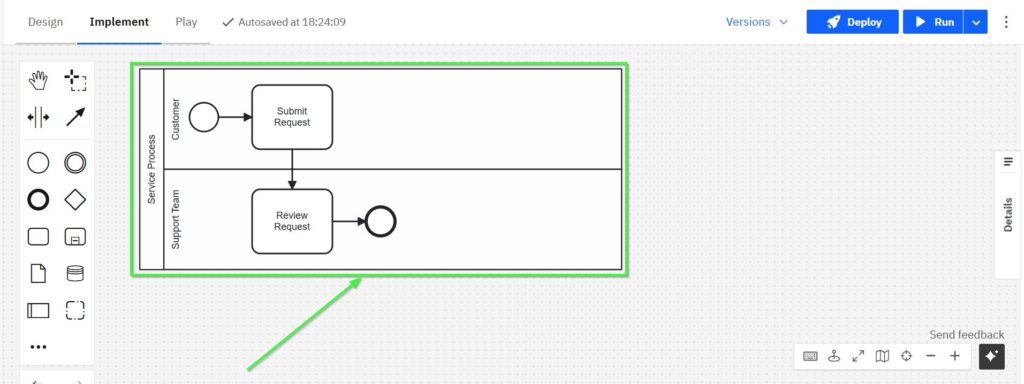
Even this small example demonstrates why lanes add value. I can see where the process begins, which responsibility performs each activity, where the handoff occurs, and where the process ends.
How I Use BPMN Lanes Effectively
I keep lane structures as simple as possible. More lanes do not automatically create a better model. In fact, too many lanes can make a diagram difficult to scan.
Therefore, I create a lane only when the distinction in responsibility matters to the process.
I also keep lane names consistent. For example, I avoid mixing organizational levels such as Department, Employee, and Application unless the process genuinely requires those distinctions.
Most importantly, I separate responsibility from participation.
I use lanes to organize responsibilities inside one participant, and I use pools when I need to model independent participants.
That single rule prevents many common BPMN modeling errors.
Conclusion
BPMN Lanes in Camunda give me a simple way to connect process behavior with responsibility. I first create the participant. Then I divide it into meaningful lanes, place the activities in the correct areas, and connect the process with sequence flows.
As a result, the model shows more than the order of activities. It also shows who performs them and where responsibility changes.
A good BPMN lane structure makes responsibility visible without making the process harder to understand.
What’s Next?
Now that I understand task duration annotations in Camunda, I can strengthen my BPMN foundation even further. Timing helps me describe process expectations. However, I also need a clear understanding of the tool and the core BPMN building blocks.
Therefore, I recommend two helpful next steps. First, What is Camunda? gives me the basic orientation and explains why Camunda matters for process modeling. Then, BPMN Core Elements with Camunda: My Hands-On Guide shows me how events, tasks, gateways, and flows work together.
Together, these articles help me connect tool knowledge with BPMN modeling knowledge. As a result, I can build clearer, more structured, and more useful process models. Click the next articles and continue your Camunda learning path with a stronger foundation.
Use Practical Tools to Improve Requirements Engineering
Requirements engineering becomes clearer when I use the right tool for each task. In my main article on Requirements Engineering Tools, I show how draw.io, Confluence, Jira, and Camunda support practical requirements work. I use draw.io to visualize ideas and processes, I use Confluence to document knowledge and decisions, and I use Jira to manage tasks, issues, and progress. Then I use Camunda to model business processes. Therefore, this article helps me build a stronger and more connected toolset.
With these insights, I can also move naturally into the main article on Processes. There, I explore Process Management, BPMN, and Camunda as a practical tool for BPMN modeling. Therefore, I can see how process thinking connects workflows, responsibilities, decisions, and improvement work. Click through to learn how Processes help me structure work, model business processes, and create stronger business value.
Credits: The diagrams were created with Camunda.