

Documenting requirements in agile development helps me turn stakeholder needs into clear, usable, and testable work. Agile teams move fast. However, speed only creates value when everyone understands the goal, scope, and expected result. Therefore, I keep documentation lean. I use it as a practical guide for decisions, delivery, and learning.
What Documenting Requirements in Agile Development Means
Why Requirements Documentation Still Matters in Agile
Best Practice 1: Start With the Goal Before the Details
Best Practice 2: Use User Stories for User-Centered Requirements
Best Practice 3: Follow the INVEST Principle
Best Practice 4: Add Clear Acceptance Criteria
Best Practice 5: Keep Requirements Simple and Clear
Best Practice 6: Collaborate With Stakeholders Continuously
Best Practice 7: Use Visual Aids When Text Is Not Enough
Best Practice 8: Use Flowcharts for Process Logic
Best Practice 9: Use Use Case Diagrams for System Interaction
Best Practice 10: Use Entity Relationship Diagrams for Data Needs
Best Practice 11: Use State Diagrams for Behavior Over Time
Best Practice 12: Use Mockups for User Interface Requirements
Best Practice 13: Prioritize Requirements With Stakeholders
Best Practice 14: Use MoSCoW for Simple Priority Decisions
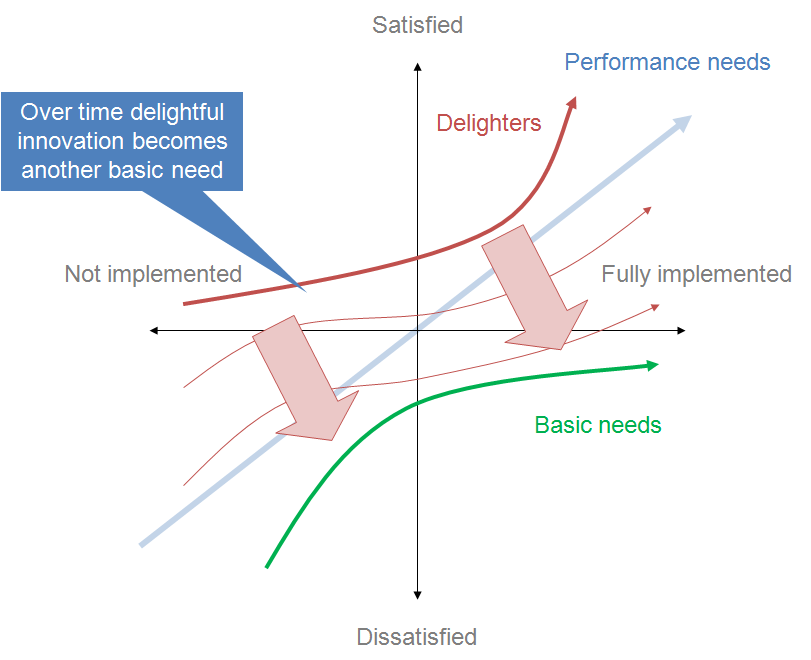
Best Practice 15: Use the Kano Model for Customer Value
Best Practice 16: Use Agile Tools Carefully
Best Practice 17: Keep Documentation Close to the Work
Best Practice 18: Review and Refine Requirements Regularly
Best Practice 19: Validate Requirements Before and After Delivery
Best Practice 20: Avoid Common Documentation Mistakes
Agile development values working software. Yet it does not reject documentation. It rejects waste. That difference matters. Good agile documentation stays lean, but it still gives the team enough clarity to build the right solution. It supports conversations. It records decisions. It explains acceptance criteria. In addition, it helps testers, developers, product owners, and stakeholders work from the same understanding.
In this article, I explain best practices for documenting requirements in agile development. I focus on clear user stories, strong acceptance criteria, stakeholder collaboration, visual models, prioritization, agile tools, and regular refinement.
What Documenting Requirements in Agile Development Means
Documenting requirements in agile development means capturing what the system should do, why it matters, and how the team can verify the result. I do not try to describe every detail too early. Instead, I document the right level of detail at the right time.
At the beginning, I may only need a product goal, a user need, or a rough feature idea. Later, I refine that idea into user stories, acceptance criteria, examples, rules, and testable details. As a result, the documentation grows with the understanding of the team.
Agile requirements documentation should support collaboration, not replace it. Therefore, I use documentation to prepare better conversations. I also use it to preserve important decisions after those conversations.
Why Requirements Documentation Still Matters in Agile
Agile teams often work under changing conditions. Stakeholders learn more. Markets shift. Technical limits appear. As a result, requirements change. However, that does not mean I can ignore documentation.
Without clear documentation, teams often rely on memory. That creates risk. People remember discussions differently. New team members miss context. Testers lack clear expectations. Developers build based on assumptions. Therefore, lightweight documentation becomes essential.
The best documentation in agile development reduces uncertainty without slowing the team down. It gives enough structure to guide delivery. At the same time, it remains flexible enough to change when the team learns something new.
Best Practice 1: Start With the Goal Before the Details
Before I write detailed requirements, I clarify the goal. I ask what problem the team wants to solve. I also ask who benefits from the solution and why the work matters now.
This step keeps documentation focused. Without a clear goal, user stories can become isolated tasks. They may describe features, but they do not explain value. Therefore, I start with the business need, user need, or product outcome.
A clear goal may answer questions such as:
What problem do users face?
Why does this problem matter?
What outcome should improve?
How will we recognize success?
A strong goal gives every requirement a reason to exist. Therefore, I connect each requirement to value. This makes prioritization easier. It also helps the team challenge unnecessary work.
Best Practice 2: Use User Stories for User-Centered Requirements
User stories work well for documenting requirements in agile development. They describe a need from the user’s perspective. Therefore, they help the team focus on value instead of internal system behavior alone.
A common user story format is:
As a [user role], I want [capability], so that [benefit].
For example:
As a customer, I want to save items in my shopping cart, so that I can buy them later.
This format looks simple. However, it forces an important structure. It names the user. It describes the need. It explains the reason behind the need.
A user story should start a conversation, not end one. Therefore, I do not use user stories as complete specifications by themselves. I add acceptance criteria, examples, business rules, and visual aids when the story needs more clarity.
Best Practice 3: Follow the INVEST Principle
The INVEST principle helps me check the quality of user stories. It reminds me that a good user story should be independent, negotiable, valuable, estimable, small, and testable.
Independent means the story should not depend too strongly on another story.
Negotiable means the team can still discuss the best solution.
Valuable means the story creates value for users, customers, or the business.
Estimable means the team can roughly assess the effort.
Small means the story fits into a manageable delivery cycle.
Testable means the team can verify whether the story works.
If a user story fails the INVEST check, I refine it before the team starts implementation. This prevents confusion later. It also helps the team split large items into smaller, clearer parts.
Best Practice 4: Add Clear Acceptance Criteria
Acceptance criteria describe the conditions that must be true before the team can accept a user story as complete. They make the story testable. They also reduce ambiguity.
I write acceptance criteria in simple language. I avoid vague words like “fast,” “easy,” or “user-friendly” unless I define them. Instead, I describe observable behavior.
For example:
The customer can add one product to the shopping cart.
The cart shows the product name, quantity, and price.
The customer can remove the product from the cart.
The cart total updates after each change.
Acceptance criteria turn a user story into a shared agreement. They help developers understand what to build. They help testers understand what to verify. In addition, they help stakeholders confirm whether the delivered result meets the need.
Best Practice 5: Keep Requirements Simple and Clear
Simple documentation does not mean weak documentation. It means useful documentation. Therefore, I avoid unnecessary complexity. I also avoid long sentences, unclear terms, and technical jargon when stakeholders do not need it.
When I document requirements, I choose direct language. I write short sentences. I use consistent terms. If I introduce a technical term, I explain it.
Clear requirements reduce the risk of wrong assumptions. This matters in agile development because teams often make decisions quickly. If the documentation remains unclear, the team may build quickly in the wrong direction.
A clear requirement should answer three basic questions:
Who needs something?
What do they need?
Why do they need it?
When needed, I also add rules, examples, constraints, and acceptance criteria.
Best Practice 6: Collaborate With Stakeholders Continuously
Requirements do not appear fully formed. I need to discover them through conversations, workshops, reviews, observations, and feedback. Therefore, stakeholder collaboration remains central when documenting requirements in agile development.
Stakeholders can include users, customers, product owners, managers, developers, testers, support teams, compliance experts, and operations teams. Each group may see the product from a different angle. As a result, each group may reveal different requirements.
Stakeholder collaboration helps me document real needs instead of personal assumptions. It also creates trust. When stakeholders see their input reflected in the backlog, they understand that the team takes their needs seriously.
However, I do not document every stakeholder wish as a requirement. First, I clarify the value. Then, I compare the need with the product goal, business priority, technical feasibility, and user impact.
Best Practice 7: Use Visual Aids When Text Is Not Enough
Text works well for many requirements. However, some information becomes clearer as a visual model. Therefore, I use diagrams, flowcharts, wireframes, mockups, process models, and other visual aids when they help the team understand complexity faster.
Visual aids make hidden structure visible. They can show process flow, user interaction, system behavior, data relationships, or decision logic. As a result, stakeholders can review requirements more easily.
For example, a flowchart can show how a user moves through a process. A wireframe can show how a screen should support a task. A state diagram can show how an object changes over time. Therefore, visual aids support both communication and validation.
Best Practice 8: Use Flowcharts for Process Logic
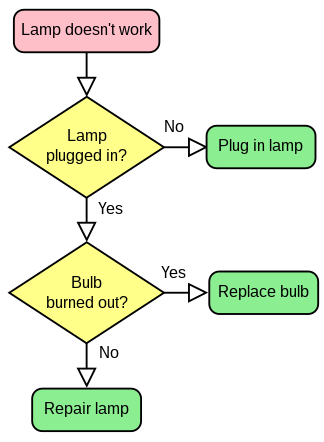
Flowcharts help me explain process steps in a simple way. They show the order of actions, decisions, and outcomes. Therefore, they work well when stakeholders need to understand a workflow.
For example, I can use a flowchart to document an order process. The diagram may show how the system receives an order, checks payment, confirms stock, and sends a confirmation.
A flowchart helps the team see where decisions happen. It also helps identify missing paths, unclear responsibilities, and possible exceptions.
Best Practice 9: Use Use Case Diagrams for System Interaction
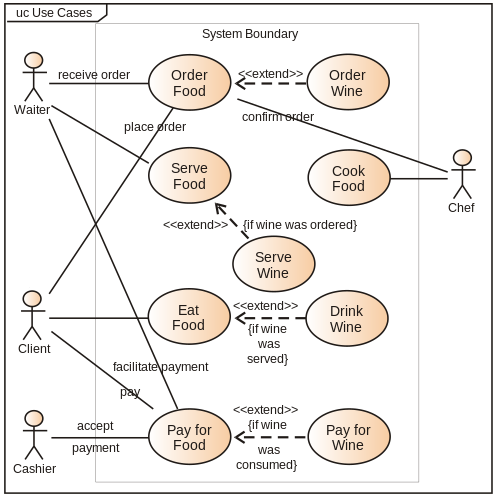
Use case diagrams help me show how users interact with a system. They focus on user goals and system functions. Therefore, they support early analysis and stakeholder communication.
A use case diagram can show user roles, system boundaries, and major functions. For example, an online shop may include customers, administrators, and payment providers. Each actor interacts with different system functions.
Use case diagrams help me define the scope of a system. They also make it easier to discuss which functions belong inside or outside the solution.
Best Practice 10: Use Entity Relationship Diagrams for Data Needs
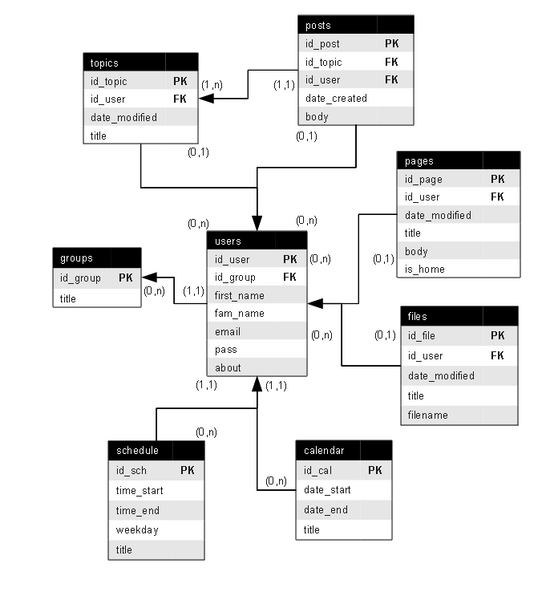
Entity relationship diagrams help me document important data objects and their relationships. They work well when a system needs structured data.
For example, an order system may include customers, orders, products, payments, and invoices. An entity relationship diagram can show how these objects connect.
Data models help prevent missing or inconsistent information. They also support better discussions with developers, database designers, and business stakeholders.
Best Practice 11: Use State Diagrams for Behavior Over Time
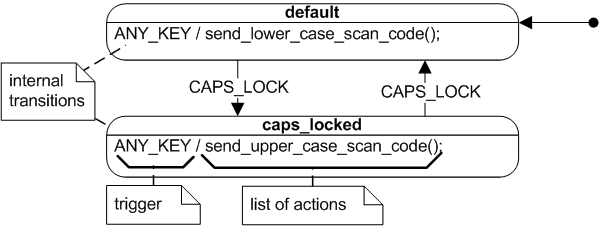
State diagrams help me describe how an object changes during its life cycle. They work well when status changes matter.
For example, an order may move from created to paid, shipped, delivered, canceled, or refunded. Each state may allow different actions. Therefore, the state diagram helps clarify rules and restrictions.
State diagrams make dynamic behavior easier to test. They show which transitions can happen and which transitions should not happen.
Best Practice 12: Use Mockups for User Interface Requirements
Mockups show how a screen, page, or form may look. They help stakeholders react to a possible user interface before the team builds it.
I use mockups when layout, navigation, input fields, buttons, or user guidance matter. Mockups do not need to look perfect. However, they should show enough structure to support discussion.
Mockups help stakeholders give feedback before expensive implementation begins. Therefore, they reduce the risk of building a user interface that looks correct technically but fails in practice.
Best Practice 13: Prioritize Requirements With Stakeholders
Agile teams cannot build everything at once. Therefore, prioritization plays a central role in documenting requirements in agile development. I need to know which requirements matter most and why.
Prioritization should include business value, user value, urgency, risk, effort, dependencies, and strategic fit. However, I do not treat prioritization as a one-time task. I review priorities regularly because new information can change the order.
Prioritization helps the team focus on the most valuable work first. It also protects the team from spending too much time on low-impact features.
Best Practice 14: Use MoSCoW for Simple Priority Decisions
The MoSCoW method divides requirements into four groups:
Must have
Should have
Could have
Won’t have for now
This method works well when stakeholders need a simple way to discuss importance. Must-have requirements define the minimum acceptable solution. Should-have requirements add important value but may wait if needed. Could-have requirements remain optional. Won’t-have requirements stay outside the current scope.
MoSCoW makes priority decisions visible and easier to discuss. However, I still need clear reasoning behind each category. Otherwise, too many stakeholders may label everything as must-have.
Best Practice 15: Use the Kano Model for Customer Value
The Kano model helps me understand different types of customer expectations. Some requirements are basic expectations. Users may not praise them, but they will complain if they are missing. Other requirements improve satisfaction as they improve performance. Some features create delight because users do not expect them.
This model helps me think beyond simple priority labels. It also helps me understand how users may react to different product features.
The Kano model helps me connect requirements with user satisfaction. Therefore, it supports better product decisions.
Best Practice 16: Use Agile Tools Carefully
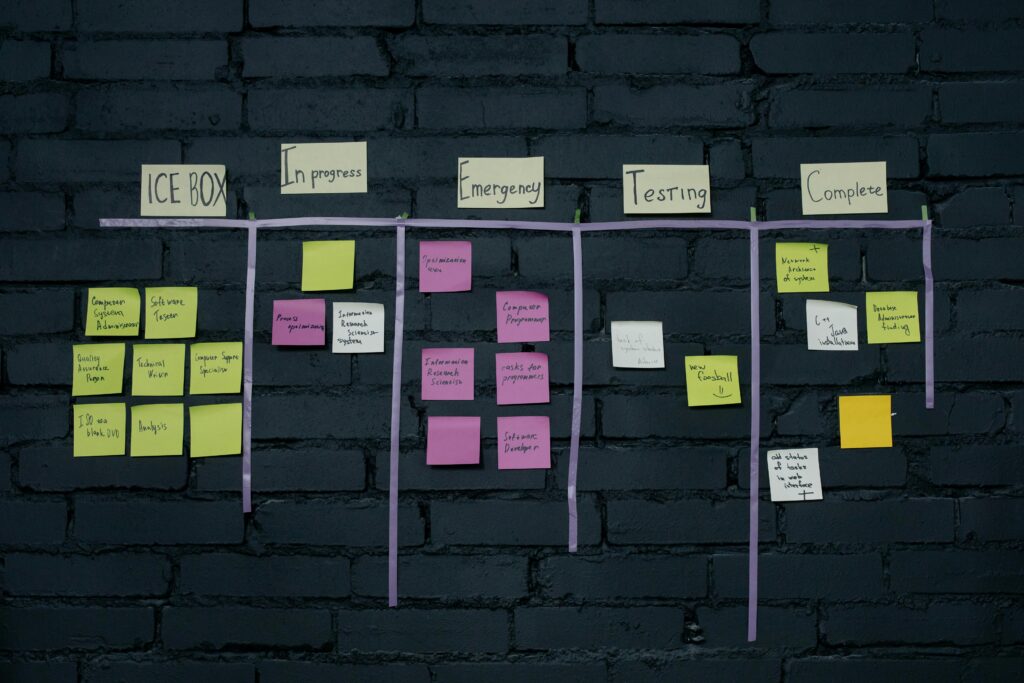
Agile tools can support requirements documentation. Examples include Jira, Confluence, Trello, Azure DevOps, Miro, and similar platforms. These tools help teams manage backlogs, document decisions, visualize work, and track progress.
However, the tool does not create clarity by itself. A confusing requirement remains confusing even when I store it in a professional tool. Therefore, I focus on quality first.
Agile tools should make requirements easier to find, understand, discuss, and update. They should not become a storage place for unclear tickets.
A useful agile tool setup may include:
A product backlog for upcoming work.
User stories with acceptance criteria.
Links to designs, diagrams, and decisions.
Clear status values.
Version history.
Comments for relevant discussions.
Dashboards for progress and transparency.
Best Practice 17: Keep Documentation Close to the Work
Agile documentation should live where the team needs it. If developers work in Jira, the user story should contain the core requirement. If stakeholders review details in Confluence, the page should link to the backlog item. If the team uses diagrams, the diagram should link back to related requirements.
Documentation loses value when people cannot find it. Therefore, I connect related information. I avoid isolated documents that nobody opens after creation.
A good structure helps the team move quickly. It also helps new team members understand decisions without asking everyone again.
Best Practice 18: Review and Refine Requirements Regularly
Requirements change because understanding grows. Therefore, I review and refine them throughout the agile process. This can happen during backlog refinement, sprint planning, stakeholder reviews, testing, and retrospectives.
During refinement, I check whether a requirement still makes sense. I also check whether the story has enough detail for implementation. If something remains unclear, I add examples, acceptance criteria, rules, or diagrams.
Regular refinement keeps requirements accurate, useful, and ready for delivery. It also helps the team discover gaps before they become defects.
Best Practice 19: Validate Requirements Before and After Delivery
Validation means checking whether the requirement reflects the real need. Testing means checking whether the system meets the requirement. Both activities matter.
Before delivery, I validate requirements with stakeholders. I ask whether the story describes the right problem. I also ask whether the acceptance criteria reflect the desired outcome.
After delivery, I compare the result with the requirement and the stakeholder need. This helps the team learn. It also improves future documentation.
Validation protects the team from building the wrong solution correctly. Therefore, I treat it as a core part of documenting requirements in agile development.
Best Practice 20: Avoid Common Documentation Mistakes
Several mistakes weaken agile requirements documentation. The first mistake is writing too much too early. This creates waste because details may change. The second mistake is writing too little. This creates confusion because the team lacks shared direction.
Another mistake is using vague language. Words like better, faster, easier, and modern need more detail. Otherwise, each person may interpret them differently.
A further mistake is separating requirements from conversations. Documentation should record important outcomes, but it should not replace collaboration.
Good agile documentation balances clarity and flexibility. It gives the team enough guidance without freezing every detail too early.
A Practical Structure for Agile Requirements Documentation
I prefer a simple structure. It keeps requirements easy to read and easy to maintain.
A useful agile requirement may include:
Title
User story
Business or user value
Acceptance criteria
Relevant business rules
Examples
Dependencies
Linked design or diagram
Open questions
Decision notes
Test notes
This structure does not need to become heavy. I only add what the team needs. However, this checklist helps me avoid missing important information.
The best structure is the one that helps the team deliver value with fewer misunderstandings.
Final Thoughts
Documenting requirements in agile development does not mean creating large documents for their own sake. It means creating useful clarity. Therefore, I document goals, user stories, acceptance criteria, priorities, visual models, decisions, and feedback in a lean way.
Strong agile requirements documentation helps the team understand what to build, why it matters, and how to verify success. It supports collaboration. It reduces risk. It improves testing. In addition, it helps stakeholders see how their needs become real product value.
When I document requirements well, I do not slow agile development down. Instead, I give the team a clearer path forward.
What’s Next?
Now that I understand how legal and regulatory documents shape requirements, I can move closer to the real challenge of software development. Projects often need more than rules, documents, and formal statements. They need clear goals, useful communication, and a shared understanding of what the system must achieve. Therefore, I continue with Getting What We Need for Challenging Software Development to explore how I can discover, clarify, and secure the requirements that truly matter.
Write a paragraph, complete with a suitable headline, designed to encourage readers to click through to the main article on “Requirements Engineering.” The topics covered therein include Elicitation, Documentation, Validation, Testing, Management, and System Analysis.
See the Bigger Picture Behind Better Systems
Read Requirements Engineering to understand how I turn business needs into clear, structured system direction. In the main article, I connect elicitation, documentation, validation, testing, management, and system analysis into one practical overview. Therefore, you can see how each activity reduces uncertainty, improves communication, and supports better IT decisions. As a result, requirements engineering becomes a strong foundation for systems that solve real problems and create lasting value.
Credits: Photo by fauxels from Pexels | Sample flowchart: by Chris Martin from Wikimedia Commons under the license CC BY-SA 3.0 DEED Attribution-ShareAlike 3.0 Unported | Example use case diagram: by Kishorekumar 62 from Wikimedia Commons under the Creative Commons Attribution-Share Alike 3.0 Unported | Example Entity Relationship Diagram from Wikimedia Commons | Example State diagram from Wikimedia Commons by is Mirosamek under Creative Commons Attribution-Share Alike 3.0 Unported | Kano model: from Wikimedia Commons under Creative Commons Attribution-Share Alike 3.0 Unported | Kanban photo by cottonbro studio from Pexels