
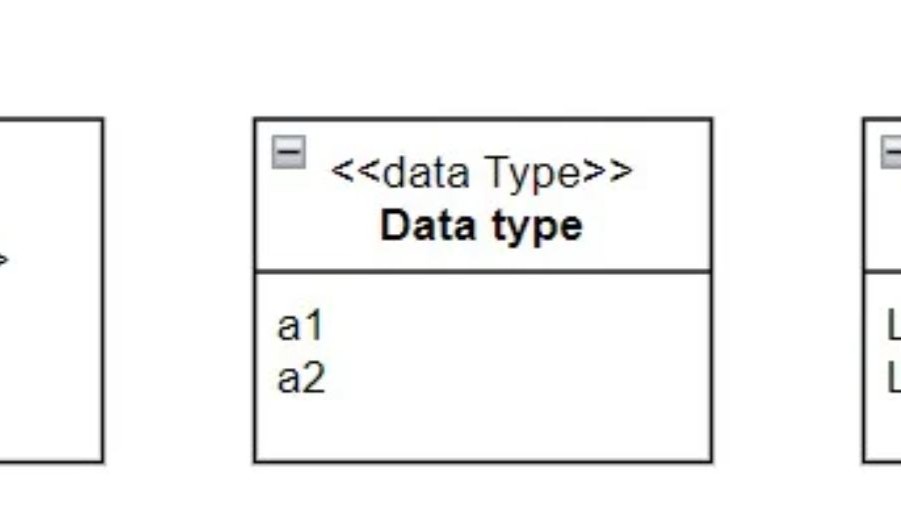
When working with UML, understanding UML structured data types is essential for clear and consistent modeling. Data types define which values a model can use, ensuring precision and preventing confusion. UML includes three main categories: primitive, structured, and enumerations. Primitive types handle basic elements like text or numbers, while UML structured data types describe complex objects. Enumerations define fixed value sets. Comparing them reveals how each supports different modeling needs.
The Main UML Data Type Forms
The three forms serve different purposes.
A primitive type represents a simple value. A structured data type combines several pieces of information. An enumeration defines a limited set of permitted values.
I choose the data type according to the structure and range of values that an attribute needs.
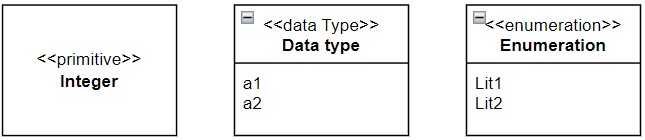
Primitive Data Types
I use primitive data types for basic values that do not need an internal structure.
For example, Integer represents whole numbers. Likewise, I can use types such as String and Boolean for text and logical values.
A primitive type therefore provides the basic building block for more complex information.
Primitive data types represent simple values without an internal attribute structure.
Structured Data Types
Sometimes one value consists of several related pieces of information. In that case, I can define a structured data type.
For example, Customer contains:
- Name: String
- Age: Integer
- IsMember: Boolean
Here, Customer combines several simpler values into one meaningful structure.
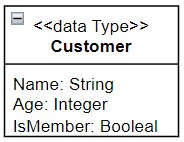
I use structured data types when several related values together describe one meaningful information structure.
Enumerations
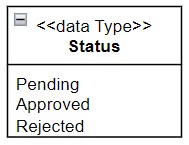
I use an enumeration when only a fixed set of values should be allowed.
For example, a Status may allow:
- Pending
- Approved
- Rejected
Instead of permitting any text, I restrict the value to these defined alternatives.
Caption:
Status with the predefined values Pending, Approved, and Rejected.
Enumerations make the permitted values explicit and prevent undefined alternatives from entering the model.
Choosing the Right UML Data Type
I keep the choice simple.
I use a primitive type for one basic value. And I use a structured type when several values belong together. Finally, I use an enumeration when the possible values come from a fixed list.
This distinction makes attributes easier to understand and gives the information model more precision.
The following table shows you the criteria for selecting the right data type:
| Aspect | Primitive Data Types | Structured Data Types | Enumerations |
|---|---|---|---|
| Definition | Simple, predefined data types | Composite data types made of multiple attributes | List of predefined, allowed values |
| Examples | Boolean, Integer, Float, Character, String | Customer (Name: String, Age: Integer, IsMember: Boolean) | Status (Pending, Approved, Rejected) |
| Complexity | Very low, elementary | Medium to high, depending on structure | Low, but specific |
| Use Cases | Basic class attributes (e.g., Age, Name) | Business objects or complex structures (e.g., Address, Product) | Attributes with fixed sets of values (e.g., OrderStatus, Gender) |
| Flexibility | Limited to basic values | Very flexible, custom structures can be defined | Restricted to predefined list |
| Typical Pitfalls | Defining everything as String → loses precision | Overly complex structures without real need | Using an enumeration when a state machine would be better |
Conclusion
UML data types help me define the information behind class attributes.
Primitive types represent basic values. Structured data types combine several related attributes. Enumerations restrict values to predefined alternatives.
The right data type makes the meaning and permitted values of an attribute explicit.
Conclusion
In summary, understanding UML data types is essential for effective modeling. Whether you’re working with simple primitive types, complex structured types, or specific enumerations, each plays a vital role in creating clear and precise UML diagrams. Remember, the key is to choose the right type for the job and keep your models as straightforward as possible. The comparison of UML data types will help you make this decision.
What’s Next?!
Now that you’ve explored how UML structured data types add clarity and depth to your models, it’s time to connect the pieces. In my next article, “Mastering Simple UML Modeling Relationships,” I’ll show how to link classes and data types effectively. Discover how mastering these relationships helps you create coherent, meaningful diagrams that reflect real-world systems with precision and structure.
Explore the Broader World of Requirements Modeling
If I want to understand requirements in a clear and structured way, I need more than text alone. I need models that show how concepts, processes, and system structures relate to each other. In the main article on Requirements Modeling, I explore Modeling Concepts, Process Modeling with BPMN, and UML to show how each perspective supports better analysis and communication. As a result, I can turn complex requirements into clearer, more practical, and easier-to-discuss system views.
This article covers concepts that are also included in the CPRE certification syllabus.